
Spintax Examples for Cold Email (and When It Hurts More Than Helps)
Spintax (spinning syntax) creates automated variations of cold email copy to prevent spam filters from flagging identical template blasts. While functional spintax examples for cold email rotate greetings, value props, and calls-to-action, poorly configured syntax produces awkward phrasing, lacks authentic relevance, and can trigger spam detection when deployed without deliverability-first guardrails.
What Is Spintax and How Does Spin Syntax Work in Cold Outreach?
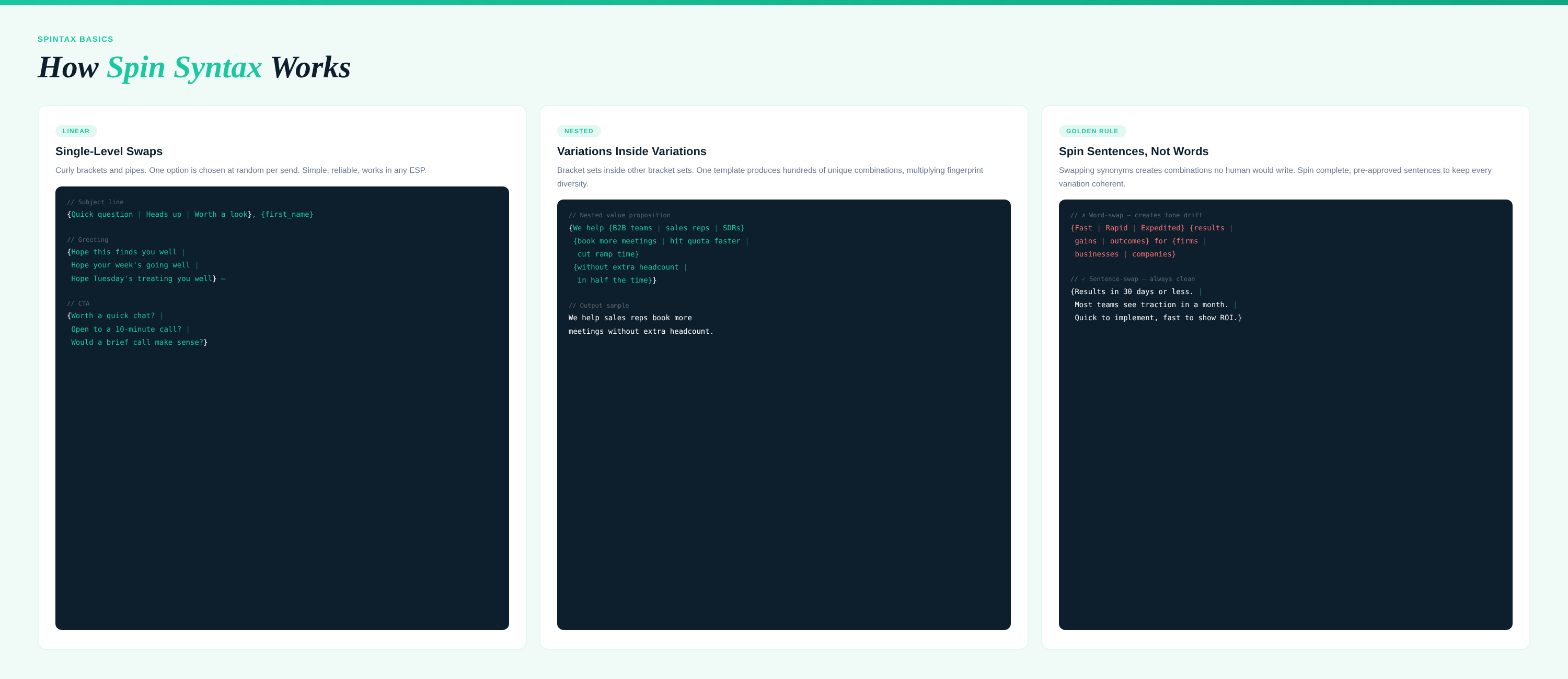
Spintax, short for “spinning syntax,” is a specialized formatting method that generates randomized text variations across outgoing email campaigns. In cold outreach automation, it works by placing alternate words, phrases, or full sentences inside curly brackets, separated by vertical pipe characters: {option 1|option 2|option 3}.
When your email platform prepares a message for dispatch, it parses this code and randomly selects one option from each bracketed set. For teams asking what is spintax in cold email workflows, the primary operational mechanics rely on two levels of complexity:
- Linear Spintax: Swaps standalone words or isolated phrases within a single sentence (for example,
{Quick question|Brief inquiry|Hello}). - Nested Spintax: Embeds spun variations inside larger spun clauses, multiplying the total unique outputs exponentially (for example,
{I saw your team is {growing|scaling}|Noticed your recent {hiring push|expansion}}).
{Hi|Hello|Hey} {{FirstName}}, {saw your recent post on|noticed your update regarding} {{CompanyTopic}}.
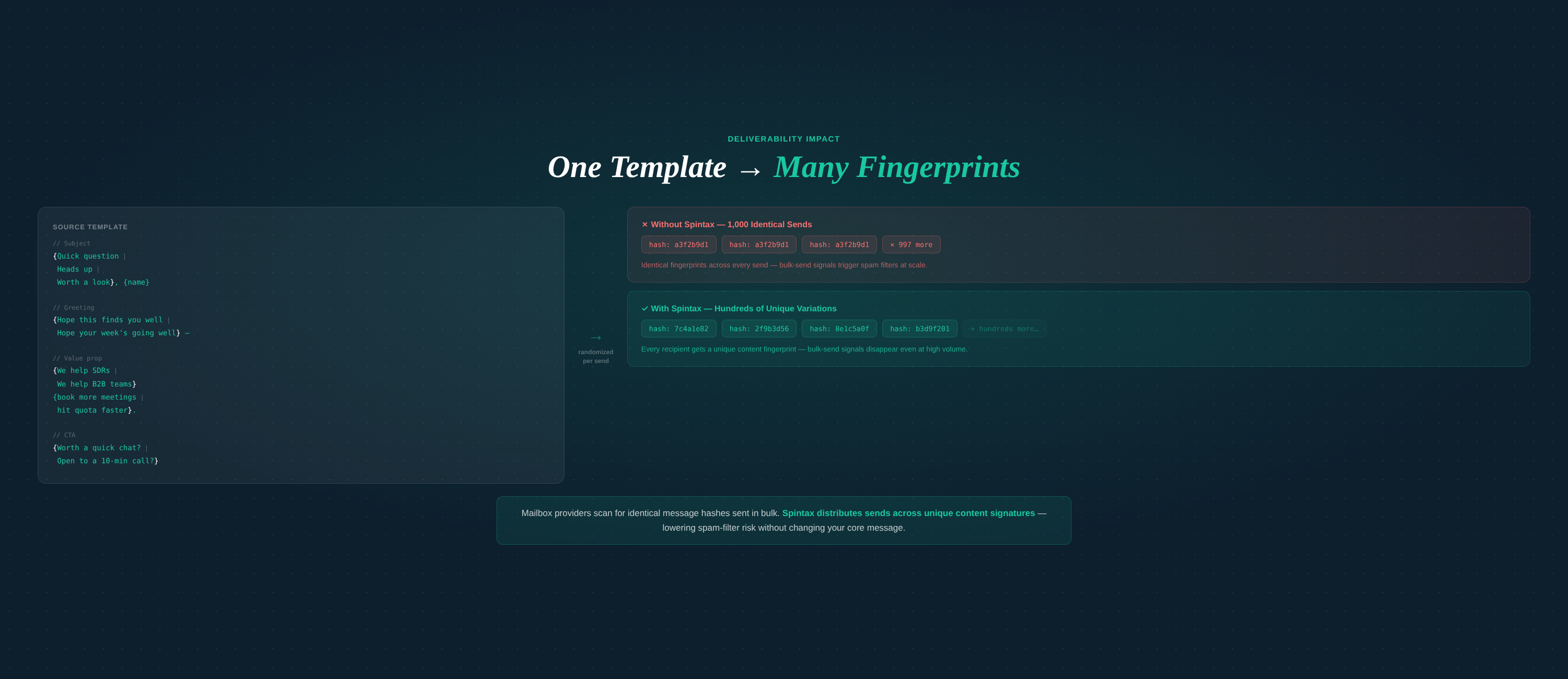
In automated email marketing setups, spin syntax ensures that an outreach list of 1,000 prospects receives hundreds of distinct message variations rather than 1,000 carbon-copy messages. While sending identical templates at scale causes email algorithms to detect bulk patterns, spintax introduces structural variation that helps campaigns navigate automated spam defenses.
High-Performing Spintax Examples for Cold Email Campaigns
Effective spin syntax examples prioritize complete sentence rewrites over single-word substitutions to preserve natural syntax, brand tone, and clarity. Below are battle-tested spintax examples for cold email sequences, structured by section.
1. Subject Lines
Subject lines require subtle variation without altering the underlying hook or deceiving the recipient.
{{FirstName}} - {quick question|thoughts on {{Topic}}|idea for {{CompanyName}}}
{{CompanyName}}'s {pipeline|lead flow|growth strategy} in Q3
{Question regarding|Quick note on} {{CompanyName}}'s {hiring goals|expansion plans}
2. Greetings and Openers
Avoid spinning formal and ultra-casual greetings together. Keep the tone unified across all variations.
{Hi|Hello|Hey} {{FirstName}},

{I came across your profile while reviewing|Saw your team's recent updates in|Noticed {{CompanyName}} while researching} {innovative SaaS providers|leaders in {{Industry}}}.
3. Body Copy and Value Proposition
Spinning entire thoughts prevents jarring grammatical errors that occur when individual verbs or nouns are rotated out of context.
{Most growth leaders we speak with struggle with deliverability drop-offs after scaling send volume.|We frequently hear that outbound campaigns lose traction once domain volume increases.|Many B2B teams hit an inbox placement wall when expanding outbound efforts.}

{We developed an autonomous system that protects sender reputation while scaling outreach.|Our platform automates deliverability guardrails so your emails consistently land in the primary inbox.|We built an intuitive workflow that simplifies sender protection without manual monitoring.}
4. Low-Friction Calls to Action (CTAs)
A reliable cold email spintax generator focuses on switching the framing of the ask rather than the meeting goal.
{Are you open to a 10-minute chat next Tuesday?|Would you be opposed to a brief discussion later this week?|Does it make sense to connect for five minutes tomorrow?}
Assembled Template in Action
When assembled, a complete spintax template reads naturally regardless of which path the rotation engine selects:
Subject: {Ideas for|Quick question regarding} {{CompanyName}}

{Hi|Hello} {{FirstName}},

{I noticed your recent expansion into enterprise accounts.|Saw your team is scaling its outbound efforts this quarter.} {Most sales teams hit deliverability issues when increasing send volume.|Scaling volume often leads to domain reputation challenges.}

{Adaptix solves this by embedding automated sender guardrails directly into your outreach engine.|We built an autonomous infrastructure that safeguards domain health while expanding campaign reach.}

{Worth a quick 5-minute chat this Thursday?|Open to comparing notes for a few minutes next week?}

{Best regards,|Cheers,|Talk soon,}
[Your Name]
How Spintax Protects Email Deliverability (The Upside)
Spintax protects email deliverability by altering the cryptographic signature and text content of each email, preventing Internet Service Providers (ISPs) from classifying your volume as an automated template blast. Major email providers like Google Workspace and Microsoft 365 use automated fingerprinting to track message similarity across thousands of incoming records.
When hundreds of identical messages hit corporate inboxes within a short window, spam filters generate a shared content hash. If several recipients mark that message as spam, the hash is blacklisted, dragging down overall spintax deliverability and routing future sends directly to the junk folder.
Identical Messages:
[Template A] ──> Hash #94021 ──> Sent 1,000x ──> ISP Flags Identical Footprint

Spintax Variations:
[Variation 1] ─> Hash #11084 ─┐
[Variation 2] ─> Hash #49201 ─┼─> Sent 1,000x ──> ISPs See Natural Human Diversity
[Variation 3] ─> Hash #83719 ─┘
By varying sentence structures, phrases, and subject lines, spintax provides:
- Fingerprint Disruption: Breaks repetitive content hashes across outbound servers.
- Volume Distribution: Distributes reputation risk across dozens of copy variations instead of relying on a single, vulnerable template.
- Safer Domain Scaling: Enables growing sales teams to scale sending volume across multiple inboxes while preserving healthy domain standing.
When combined with systematic tracking and domain migration protocols, randomized text variations form an essential first line of defense for cold outreach infrastructure.
When Does Spintax Hurt More Than It Helps?
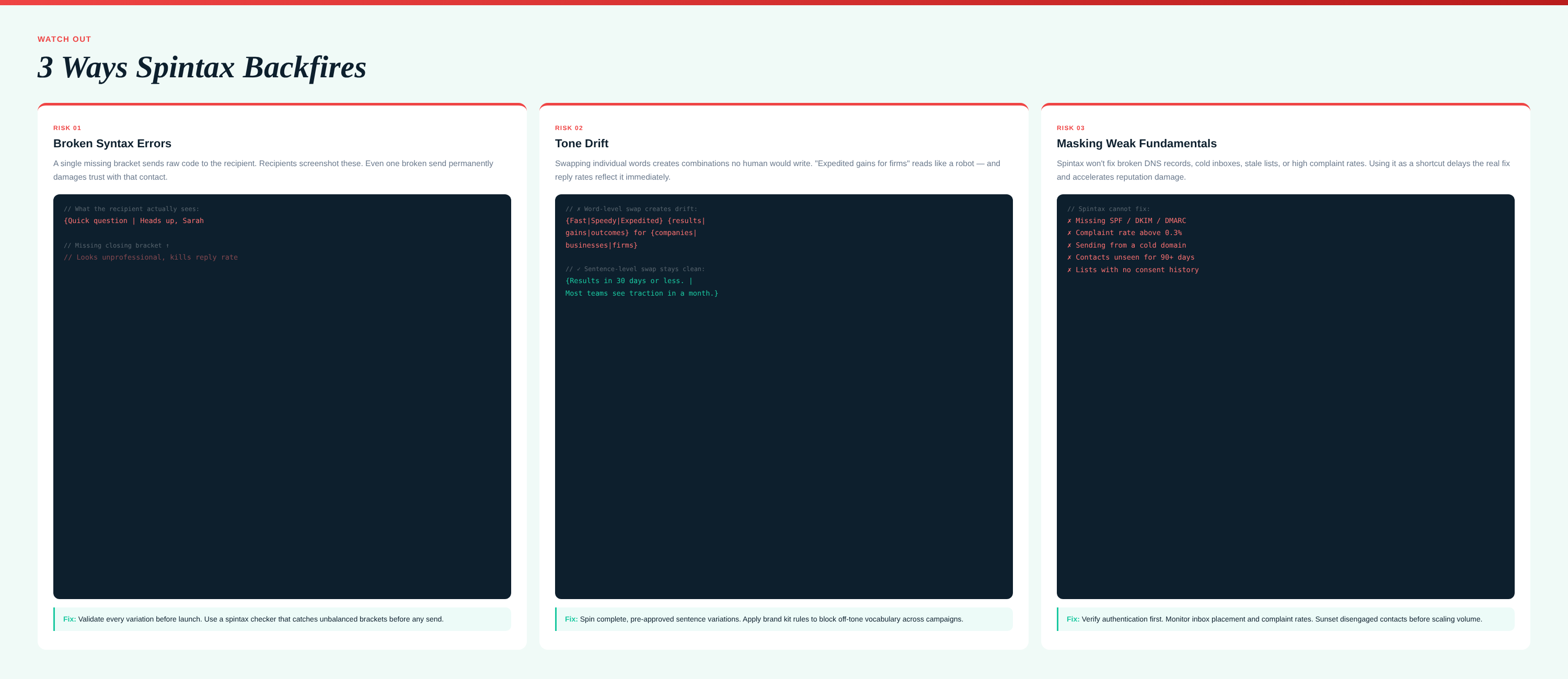
Spintax hurts cold outreach performance when mechanical word substitution introduces grammatical errors, breaks tone consistency, and substitutes generic text variations for genuine prospect relevance. While spinning helps bypass algorithmic spam filters, it fails if it degrades human readability.
1. Syntax Breakage and Visual Glitches
A single missing bracket, stray pipe, or misplaced space exposes your raw code directly to the recipient:
“Hi Alex, {I noticed your profile|Saw your company and wanted to connect.”
Nothing triggers an immediate deletion or manual spam report faster than raw code visible in the inbox.
2. Tone Fragmentation and Brand Damage
Randomized synonyms rarely carry identical connotations. Swapping “intuitive” with “simple” might preserve sentence logic, but swapping “affordable” with “cheap” alters brand perception. If you run outbound campaigns without strict brand kit standards, uncurated spintax can make enterprise teams sound careless or unprofessional.
3. Masking Poor Fundamentals
Spintax is not a remedy for unauthenticated domains, stale contact data, or poorly warmed inboxes. Relying solely on syntax variation creates a false sense of security while ignoring core deliverability metrics like bounce rates, SPF/DKIM/DMARC alignment, and spam complaint thresholds.
Spintax vs. Modern Dynamic Personalization: Which Scales Better?
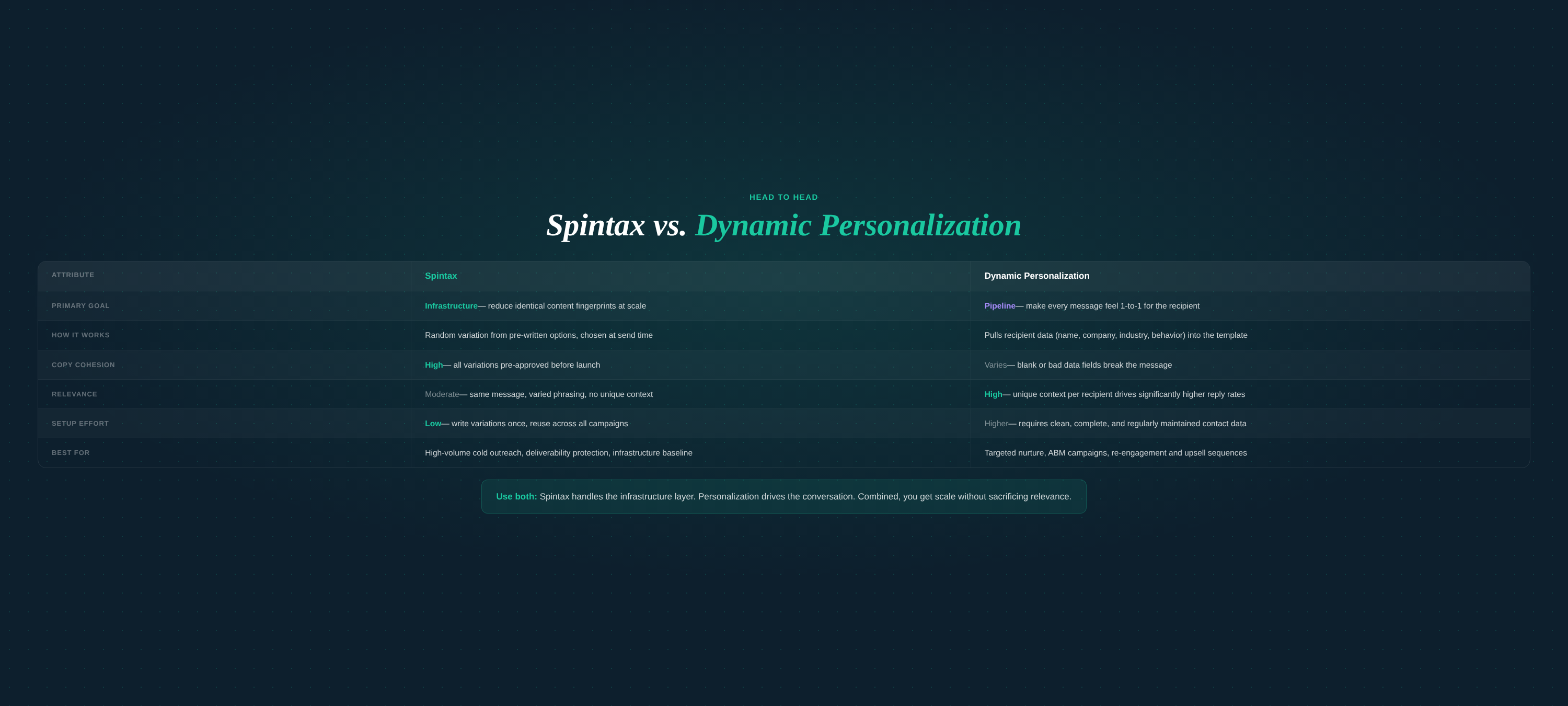
Modern dynamic personalization scales significantly better than traditional spintax because it tailors messages using verified account intelligence, intent signals, and audience segmentation rather than randomized vocabulary games.
While spintax simply reorganizes generic copy, dynamic personalization uses predictive AI tools to alter value propositions according to industry, company stage, tech stack, and real-time triggers.
| Feature / Metric | Traditional Spintax | Dynamic Personalization |
|---|---|---|
| Primary Objective | Evade content-based spam filters | Drive relevant, revenue-generating conversations |
| Variation Mechanism | Pseudo-random word and clause rotation | Data-driven logic and prospect segmentation |
| Copy Cohesion | High risk of robotic tone and syntax breaks | Consistent brand voice governed by brand kit rules |
| Relevance | Broad, generic, non-specific | Highly contextualized to recipient pains and industry |
| Setup Complexity | High manual effort to draft nested syntax | Automated through intuitive AI workflows |
| Conversion Impact | Preserves inbox access; low impact on reply rates | Directly lifts reply and qualified meeting rates |
Spintax primarily solves an infrastructure challenge: content-fingerprinting defenses. Dynamic email personalization solves a commercial challenge: pipeline generation. Forward-thinking sales and marketing teams use autonomous systems that combine both disciplines—applying deliverability-first protection at the technical layer while serving hyper-relevant messaging to segmented audiences.
Deliverability-First Best Practices and Guardrails for Spintax
Deploying cold outreach deliverability guardrails requires combining structured syntax testing, multi-inbox rotation, and unified multichannel touches to protect your domain reputation. To scale without compromising inbox placement, follow these standard practices:
- Spin Entire Sentences, Not Single Words: Avoid single-adjective swaps like
{fast|quick|rapid}. Instead, spin full, grammatically complete thoughts to eliminate broken transitions and mismatched verb tenses. - Run Stringent Preview Validation: Check every message variation in an automated validator before launching. Verify that all open curly brackets (
{) pair with corresponding closing brackets (}). - Maintain Centralized Brand Kit Rules: Ensure every spun permutation aligns with brand vocabulary, compliance policies, and audience-appropriate terminology.
- Layer Outreach Across Channels: Do not rely exclusively on cold email volume. Integrate SMS marketing to engage responsive leads and direct prospects to contextual landing pages tailored to their market segment.
- Monitor Technical Deliverability Continuous: Even high-variation campaigns will fail if domain health drops. Track technical authentication, monitor migration health across domains, and track automated inbox placement rates.
Scale Outbound with Built-In Deliverability Guardrails
Spintax remains a helpful tactical tool for diversifying content signatures, but winning outbound campaigns require more than randomized phrasing. Long-term pipeline growth depends on reliable inbox placement, data-backed segmentation, and messaging that resonates with real decision-makers.
Adaptix provides an intuitive, deliverability-first marketing automation platform designed for modern growth teams. By combining autonomous email marketing, multichannel SMS workflows, dynamic landing pages, and AI-driven predictive targeting, Adaptix eliminates the guesswork of deliverability and campaign optimization.
Ready to protect your sender reputation and scale pipeline with simplified, high-performing outreach? Explore Adaptix today and take command of your email deliverability.

Frequently asked questions
What is a basic spintax example for cold outreach?
A standard spintax structure uses curly brackets and pipes, such as: “{Hi|Hello|Hey} {{firstName}}, {loved|enjoyed|came across} your recent update on LinkedIn.” Each time an email is generated, the sending tool randomly selects one variation from each bracketed set, producing multiple unique permutations from a single core draft.
Does using spintax improve email deliverability?
Yes, to a degree. Major email service providers look for fingerprint patterns in outbound messages. Sending thousands of identical messages raises red flags. By rotating sentence structures, phrases, and subject lines, spintax creates unique content fingerprints, reducing the likelihood of template-level spam filtering across large volume campaigns.
Can email spam filters detect spintax?
Spam filters do not read raw spintax code because variations are rendered before delivery. However, modern spam engines use semantic analysis. If spintax produces grammatically disjointed, unnatural, or erratic phrasing, predictive algorithms can identify the content as automated machine-generated spam, harming your sender reputation.
What is the difference between spintax and dynamic personalization?
Spintax mechanically swaps interchangeable words or phrases to evade duplicate content detection, regardless of recipient attributes. In contrast, dynamic personalization uses profile data, behavioral triggers, and account-level segmentation to inject specific, relevant context tailored to individual prospects and their business needs.
When does spintax hurt cold email performance?
Spintax hurts campaigns when over-spinning yields nonsensical sentences, mismatched tones, or broken syntax. Furthermore, relying solely on mechanical variation instead of relevance leads to lower response rates and higher spam complaint rates, which directly negates any technical deliverability benefit spintax provided.
