
Why Are My Emails Going to Spam? A 10-Minute Deliverability Checklist
Emails land in spam primarily due to missing domain authentication (SPF, DKIM, DMARC), poor sender reputation, high spam complaint rates, inactive subscriber lists, or spam-triggering content. Resolving these issues requires verifying DNS records, cleaning subscriber lists, implementing automated deliverability guardrails, and sending relevant, segmented campaigns that drive positive recipient engagement.
If you are a small business owner wondering, “Why are my emails going to spam after months of normal delivery?”, you are not alone. Modern mailbox providers like Google, Yahoo, and Microsoft update their filtering algorithms continuously to protect user inboxes. A single misconfigured technical record or an outdated contact list can suddenly push your revenue-driving promotional campaigns and transactional notifications into the junk folder.
This 10-minute email deliverability checklist walks you through a practical sender reputation audit. By addressing technical protocols, audience hygiene, message design, and sending patterns, you can fix email deliverability and ensure your messages consistently reach the primary tab.
Why Are Your Emails Landing in the Spam Folder?
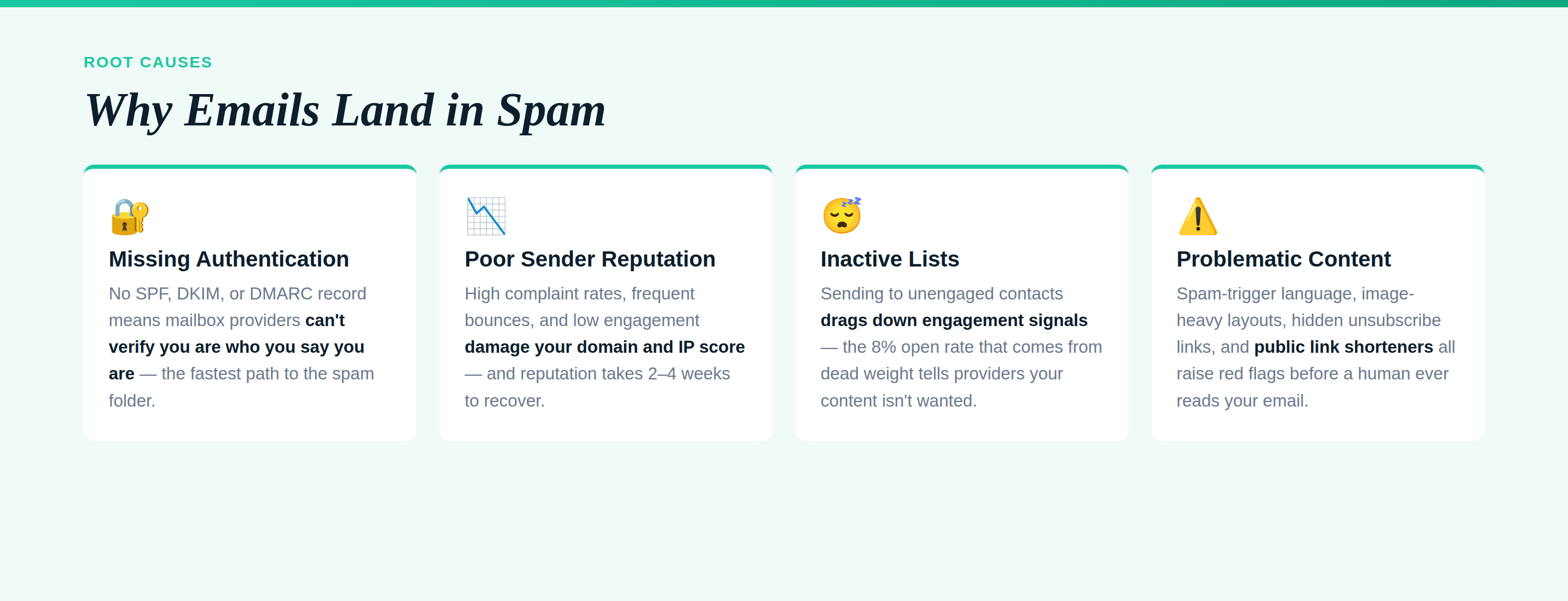
Emails land in the spam folder because inbox service providers evaluate your sending history, technical domain credentials, and recipient engagement signals, concluding that your message carries risk. Rather than viewing an email in isolation, automated filtering engines use predictive models to determine whether a message resembles legitimate business communication or unwanted bulk outreach.
Understanding why your messages divert away from the inbox comes down to three primary pillars:
- Authentication and Technical Identity: Providers need cryptographic proof that you own the sending domain. If your message fails basic verification checks, automated defenses classify it as a potential spoofing or phishing attempt.
- Sender and Domain Reputation: Mailbox providers calculate a dynamic reputation score for your domain and sending IP. If past sends triggered spam complaints, hit spam traps, or generated high bounce rates, your reputation drops, resulting in emails landing in spam folder destinations across entire provider networks.
- Engagement Signals: Email algorithms prioritize messages that recipients open, read, reply to, and click. Conversely, when recipients ignore your emails, delete them unread, or manually click “Report Spam,” providers interpret this negative feedback as a signal to route future messages straight to junk.
When small businesses neglect these signals, deliverability decays quietly. Running a quick audit pinpoints where the breakdown occurs.
Step 1: Verify Technical Authentication (SPF, DKIM, and DMARC)
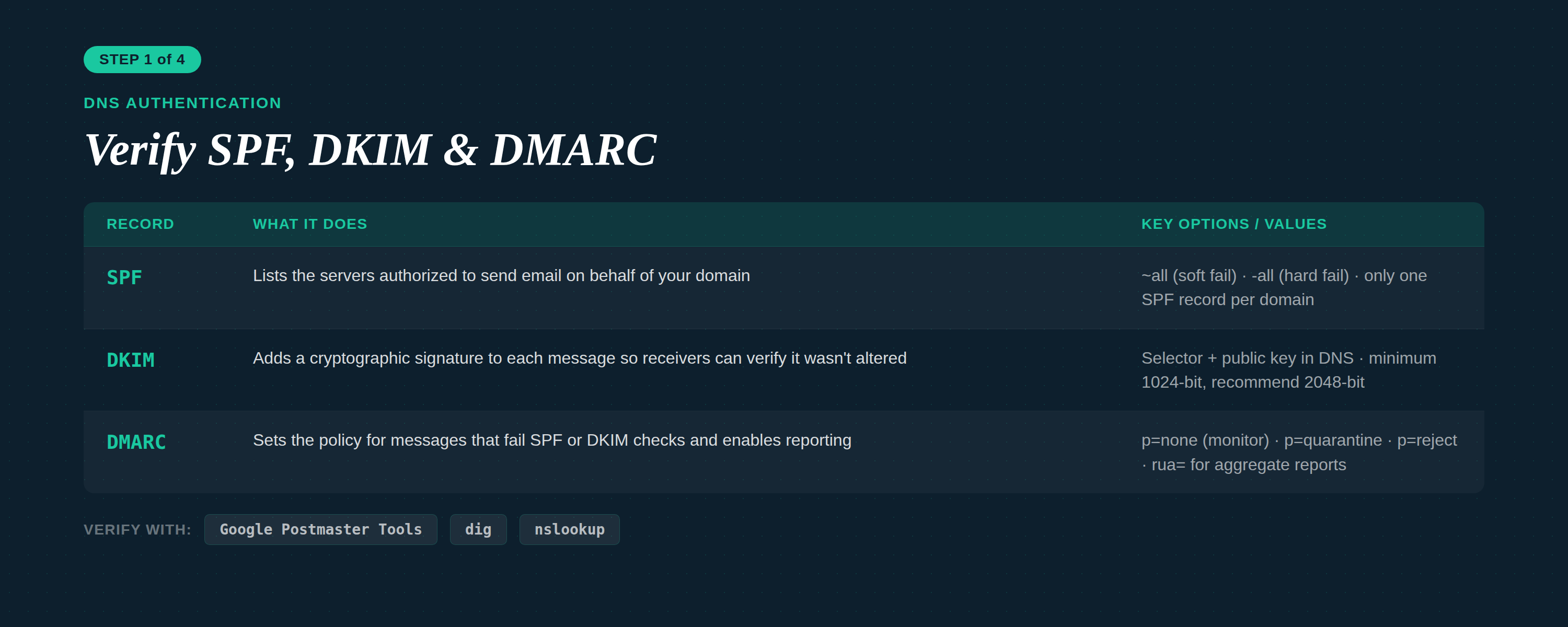
You verify technical authentication by querying your domain’s DNS records to confirm that SPF, DKIM, and DMARC entries are correctly published and aligned with your sending platform. Without proper SPF DKIM DMARC setup, receiving servers cannot verify that your email marketing platform has permission to send messages on behalf of your brand.
Both Google and Yahoo enforce strict authentication thresholds for senders. If your domain lacks these three protocols, receiving mail servers will either quarantine your emails in spam or block them completely.
| Protocol | What It Does | Configuration Requirement | Deliverability Impact if Missing |
|---|---|---|---|
| SPF (Sender Policy Framework) | Lists authorized sending IPs and services inside a TXT record. | Add an authorized v=spf1 TXT record in your DNS settings. | High bounce rates; providers treat unlisted servers as unauthorized. |
| DKIM (DomainKeys Identified Mail) | Attaches a cryptographic signature to email headers to verify message integrity. | Publish public keys provided by your email platform into DNS. | Messages risk alteration in transit; triggers instant spam filtering. |
| DMARC (Domain-based Message Authentication) | Specifies instructions for handling messages that fail SPF or DKIM checks. | Add a _dmarc TXT record with a policy (p=none, p=quarantine, or p=reject). | Major providers reject or spam-route unaligned messages automatically. |
To audit your setup in minutes:
- Use free verification tools like Google Postmaster Tools or terminal DNS lookup commands (
digornslookup) to confirm your records exist. - Ensure your DMARC alignment matches the domain in your “From” header.
- Confirm your custom tracking domain aligns with your authenticated root domain to avoid third-party redirect flags.
Step 2: Clean Inactive Subscribers and Audit List Hygiene
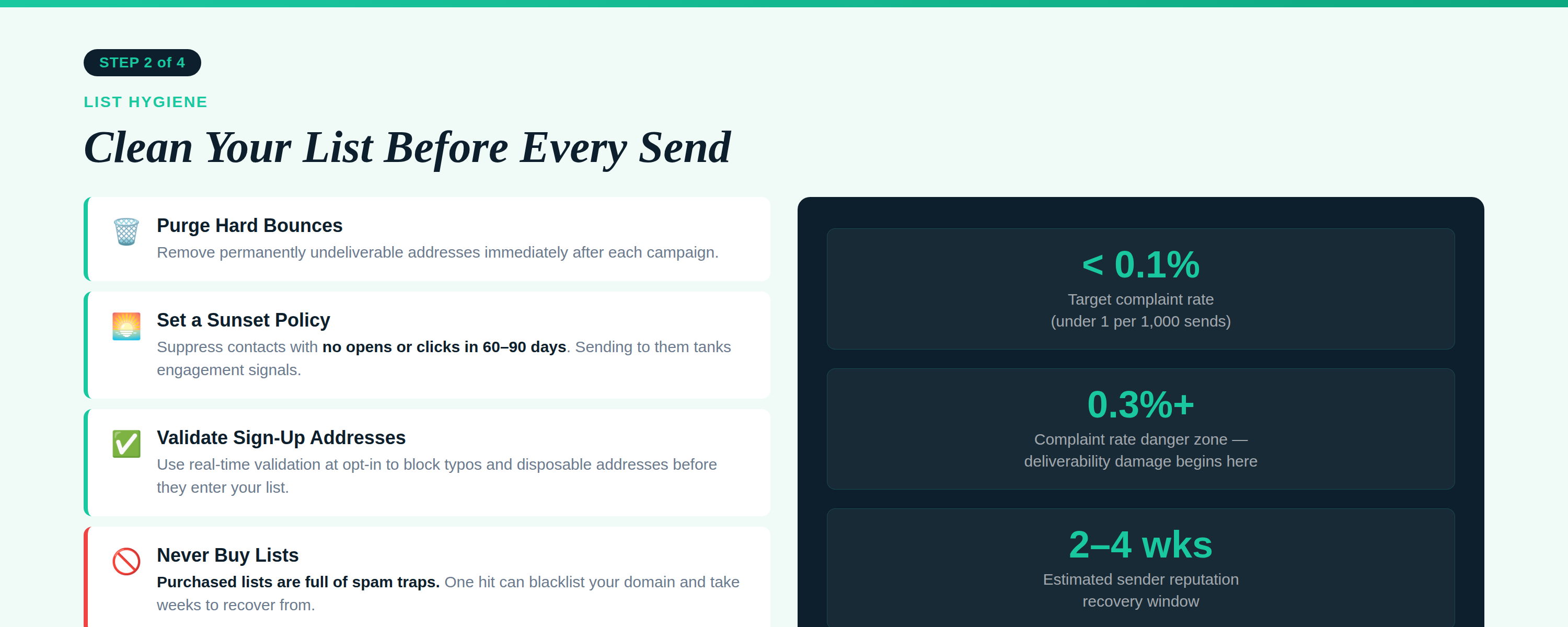
You audit list hygiene by identifying and removing invalid email addresses, hard bounces, unengaged contacts, and outdated signups from your active sending database. Continuing to send campaigns to unengaged recipients signals to mailbox providers that you do not maintain your lists, which quickly damages your domain reputation.
Unhealthy lists cause two severe deliverability problems:
- Spam Traps: Outdated or abandoned email addresses often turn into “recycled spam traps” maintained by security organizations. Hitting even one trap can land your sending IP on global blocklists.
- Low Engagement Ratios: If you send to 10,000 subscribers but only 800 open your campaigns, your 8% open rate alerts algorithms that users do not value your content.
To execute a rapid list hygiene audit:
- Purge Hard Bounces Immediately: Remove permanently undeliverable addresses automatically using suppression lists.
- Implement a Sunset Policy: Segment contacts who have not opened or clicked an email in 60 to 90 days. Send an automated re-engagement campaign offering an opt-out, then remove non-responders permanently.
- Verify Incoming Addresses: Implement real-time list validation on your landing pages and forms to block typos and disposable emails before they enter your database.
- Never Purchase Lists: Third-party lists contain scrapings, bot addresses, and honeypots that guarantee inbox delivery failure.
Step 3: Scan Email Content, Copy, and Links for Spam Triggers
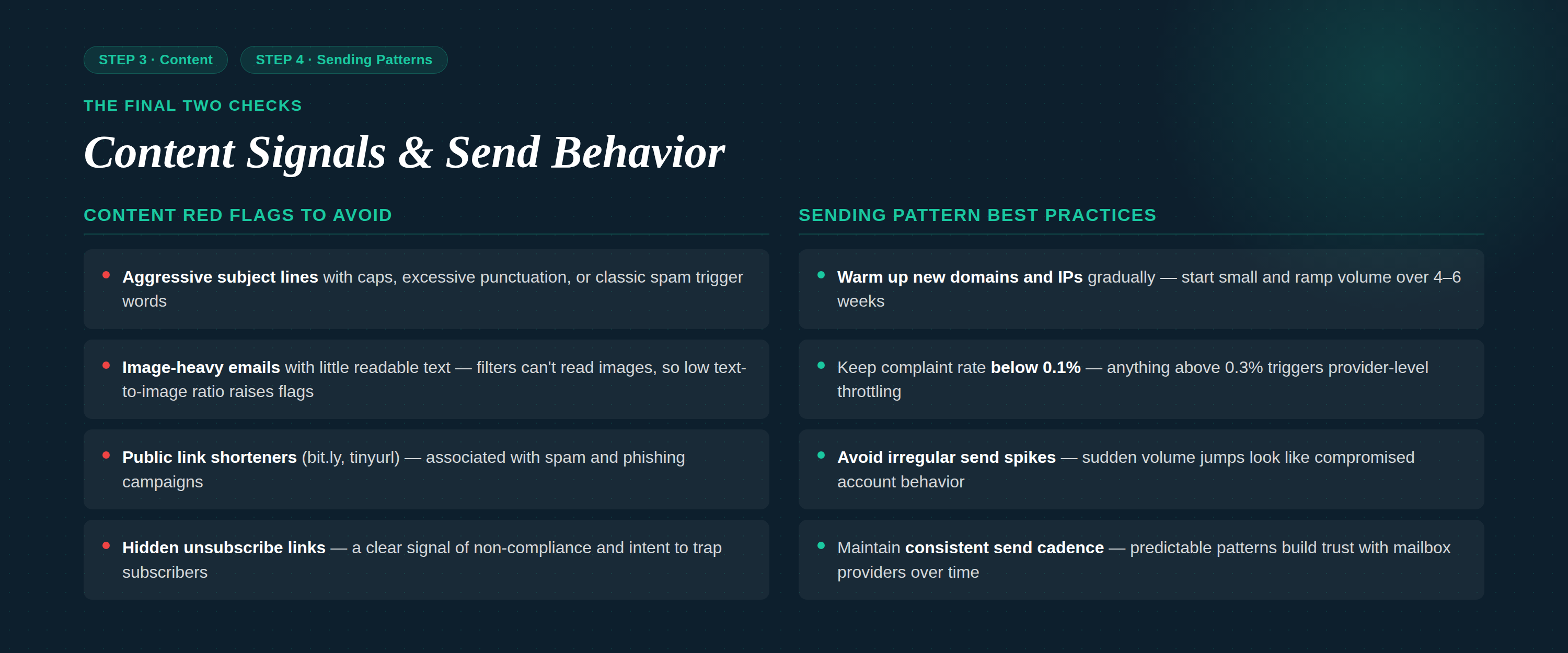
You scan email content by evaluating your copy, HTML formatting, links, and layout to ensure they conform to modern inbox standards and do not trigger heuristic spam filters. While technical authentication confirms who you are, content filtering evaluates what you are sending.
Heuristic engines evaluate email spam triggers across several structural elements:
- Aggressive Subject Lines and Copy: Avoid excessive capitalization, repeated punctuation (e.g., “BUY NOW!!!”), and deceptive prefix tags like “Re:” or “Fwd:” on marketing messages. Maintain a professional, conversational tone aligned with your saved brand kit.
- Image-to-Text Imbalance: Sending a campaign that consists of a single large graphic without accompanying HTML text raises red flags. Historically, spammers used images to hide deceptive text from scanners. Ensure every campaign contains a balanced ratio of live, machine-readable text and compressed imagery.
- Problematic Links and Shorteners: Generic public link shorteners (like standard bit.ly links) are frequently abused by bad actors and often trigger immediate domain filtering. Always use full URLs or branded tracking domains configured within your marketing platform.
- Unclear Unsubscribe Mechanisms: Make your unsubscribe link clear, intuitive, and operable in a single click. Hiding the opt-out button forces frustrated subscribers to click “Report Spam,” which is far more damaging to your deliverability than an unsubscription.
Step 4: Check Sending Volume Patterns and IP Reputation
You check sending volume patterns by auditing whether your email distributions follow consistent, predictable schedules rather than sudden, massive surges that mimic malicious bot activity. Mailbox providers monitor throughput closely; an irregular surge in outbound messages from a relatively quiet domain looks suspicious to automated monitoring systems.
Maintaining strong volume practices requires attention to three core areas:
1. Warm-Up Schedules
If you register a new domain, switch email marketing tools, or add a dedicated sending IP, you cannot send tens of thousands of emails on day one. You must warm up your infrastructure gradually. Start with small batches sent to your most engaged subscribers, doubling volume every few days as positive engagement signals accrue.
2. Complaint Rate Thresholds
Keep your spam complaint rate strictly below 0.1% (fewer than 1 complaint per 1,000 sent messages). If your complaint rate reaches or exceeds 0.3%, providers like Google and Yahoo will flag your domain, sending future emails straight to the spam folder or blocking delivery entirely.
3. Consistency Over Spikes
Avoid sending zero marketing campaigns for three weeks and then blasting your entire contact database three times in two days. Predictable, scheduled sends help algorithms model your behavior as a trusted commercial sender.
How Deliverability-First Automation Protects Your Inbox Placement
Deliverability-first automation protects your inbox placement by embedding technical guardrails, intelligent segmentation, and real-time list protection directly into your sending infrastructure. Rather than forcing small business teams to perform manual checks before every campaign, modern marketing platforms automate reputation management in the background.
At Adaptix (adaptix.ai), deliverability is built into the core marketing engine rather than treated as an afterthought. Here is how autonomous, deliverability-focused systems safeguard your revenue:
- Autonomous Deliverability Guardrails: Intelligent systems monitor bounce rates, unsubscribes, and spam complaints across every campaign. When negative thresholds are approached, predictive guardrails automatically pause or throttle sends to protect domain health before penalties occur.
- Predictive Engagement Segmentation: Autonomous AI tools segment your audience by behavioral frequency, delivering messages when individual subscribers are most likely to interact. By serving content only to engaged cohorts, overall engagement metrics rise, signaling inbox providers to prioritize your domain.
- Simplified DNS & Platform Migration: Moving between providers often leads to broken authentication. Deliverability-first platforms offer guided setups that eliminate configuration errors for SPF, DKIM, and DMARC records.
- Unified Multi-Channel Journeys: Coordinate your email marketing alongside SMS marketing and high-converting landing pages. If an email goes unread, automated workflows can divert critical notifications through SMS, preventing sender fatigue while driving conversion.
By combining reliable technical foundations with autonomous automation, businesses spend less time troubleshooting spam filters and more time generating revenue.
Take Control of Your Inbox Placement Today
Understanding the root cause behind why your emails go to spam removes the guesswork from email marketing. By verifying your SPF, DKIM, and DMARC authentication, removing inactive subscribers, eliminating common content triggers, and maintaining consistent sending volumes, you establish a resilient sender reputation that algorithms trust.
Deliverability is an ongoing discipline, not a one-time fix. Protect your domain health with scalable, intuitive tools designed to keep your campaigns front and center.
Ready to leave the spam folder behind? Explore how Adaptix provides deliverability-first email automation, autonomous segmentation, and simplified customer journeys to maximize your business revenue.

Frequently asked questions
How do I know if my emails are going to spam?
You can detect spam placement by monitoring sharp declines in open rates, tracking bounce rates, and using seed list testing tools. Additionally, checking Google Postmaster Tools provides visibility into domain reputation and delivery errors that indicate spam filtering.
Can missing DNS records cause emails to go to spam?
Yes. Major inbox providers like Google and Yahoo require proper SPF, DKIM, and DMARC authentication. Without these records, receiving servers cannot verify your identity, often routing your messages directly to spam or rejecting them outright to prevent phishing.
Does sending frequency affect email deliverability?
Sending frequency significantly influences deliverability. Sudden spikes in volume signal spam behavior to internet service providers. Consistent, predictable sending patterns paired with automated pacing protect your sender reputation and maintain favorable inbox placement across major mailbox providers.
How does list segmentation improve inbox placement?
List segmentation ensures subscribers receive relevant content aligned with their interests and behavior. High engagement signals—such as opens, clicks, and replies—tell mailbox providers that recipients value your emails, directly improving domain reputation and future inbox placement.
How long does it take to fix a damaged sender reputation?
Recovering a damaged sender reputation typically takes two to four weeks of disciplined sending practices. The process requires removing unengaged contacts, authenticating domains, resolving technical errors, and temporarily sending exclusively to your most active subscribers to rebuild trust.
