
Email Format: Structure, Best Practices, and Examples That Get Replies
A strong email format makes your message easy to understand, fast to scan, and simple to act on. That matters because most people don’t “read” emails—they triage them. If your email looks unclear or time-consuming, it gets postponed (or ignored), even if your request is reasonable.
This guide covers:
- what email format is (and why it matters)
- the best email structure to use in most situations
- formatting rules that improve clarity and professionalism
- examples for common business scenarios
- a quick table you can use to choose the right format fast
- how Adaptix helps keep formatting consistent across your team
What is Email Format?
Email format is the structure and presentation of an email—how you organize the subject line, greeting, body, closing, and signature so your message is clear and professional.
A good format helps you:
- communicate your purpose quickly
- reduce back-and-forth
- increase replies and completion rates
- avoid confusion, missed attachments, and vague requests
The Best Email Format (Use This 80% of the Time)
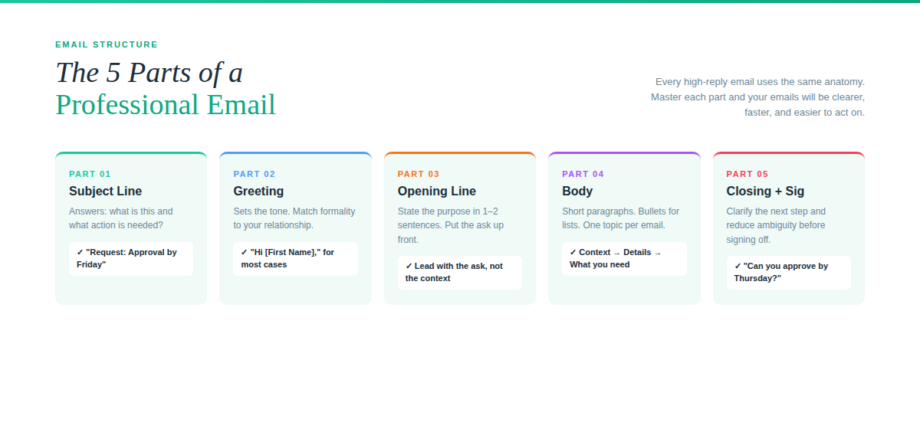
1) Subject line: clear and specific
Your subject line should answer: What is this and what’s the action (if any)?
Best practices
- Keep it short and meaningful (mobile-friendly)
- Use a “label + topic” approach when helpful: Request:, Update:, Reminder:, Re:
- Avoid hype (“Urgent!!!”) and vague subjects (“Question”)
Examples
- Request: Approval needed: Q2 budget by Friday
- Update: Project timeline update + next steps
- Meeting: 15-min check-in next week?
2) Greeting: match the context
Choose a greeting based on formality and relationship:
- Professional default: Hi [First Name], / Hello [First Name],
- Formal: Dear [Title + Last Name],
- Group: Hi team, / Hello everyone,
If you’re unsure, use Hello [First Name] (professional and neutral).
3) Opening line: state the purpose fast
In 1–2 sentences:
- reference context if needed (meeting, thread, request)
- state what you’re emailing about
Examples
- “I’m following up on the proposal—could you confirm next steps?”
- “Quick update on [project]: we’re on track, but need approval on X.”
4) Body: make it skimmable
Use short paragraphs and bullets. Keep to one topic when possible.
Skimmable structure
- Context: (1–2 lines)
- Key details: bullets/numbered list
- What you need: one clear next step
Example body layout
- What changed
- Why it matters
- What I need from you (and by when)
5) Closing + signature: clarify next step
A strong closing reduces ambiguity.
Action-based closings
- “Can you approve by Thursday?”
- “Which option do you prefer—A or B?”
- “If I don’t hear back, I’ll proceed with X.”
Sign-offs
- Best regards, / Thanks, / Sincerely,
Signature essentials
- Name
- Role/company (if relevant)
- Phone (optional)
Email Formatting Rules That Make You Look More Professional
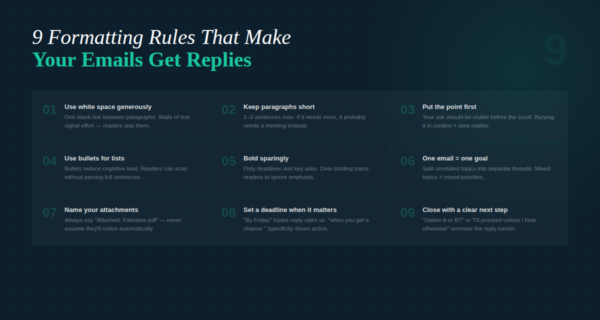
These are small changes that make a big difference:
- Use white space: one blank line between paragraphs
- Keep paragraphs short: 1–3 sentences
- Prefer bullets for lists: reduces cognitive load
- Bold sparingly: only for deadlines or key asks
- Avoid fancy fonts and colors: keep it clean and readable
- Mention attachments clearly: “Attached: Q2_Budget.xlsx”
- One email = one goal: split topics into separate emails when possible
The “Top of the Page” Rule: Put the Point First
If your email has an ask, your recipient should see it in the first few lines. Burying the request in the middle is one of the fastest ways to get ignored.
Weak: paragraphs of context → ask at the end
Strong: ask + deadline → then context → then details
Table: Email Type → Best Format → Subject Line Examples
Email type | Best structure | Subject line examples |
|---|---|---|
Informational update | 1-line summary → bullets → next steps | “Update: Q3 timeline + next steps” / “Project update: status + blockers” |
Request / approval | ask + deadline → context → bullets → CTA | “Approval needed: [item] by [date]” / “Request: review by Friday” |
Follow-up | reference → restate ask → 2-option close | “Follow-up: [topic]” / “Re: [thread] — next step?” |
Meeting request | reason → proposed times → CTA | “Quick call re: [topic]” / “15 minutes next week?” |
Introduction | who you are → why reaching out → CTA | “Intro: [name] + [purpose]” / “Connecting about [topic]” |
Sales outreach (warm) | context → value → proof → CTA | “Idea for [company]” / “Quick win for [team]” |
Sales outreach (cold) | relevance → value → low-friction CTA | “Question about [trigger]” / “Worth a quick look?” |
Complaint response | empathy → action taken → next step | “Re: [issue] — resolution update” / “Next steps to resolve [issue]” |
Apology | acknowledge → fix → prevention → CTA | “Apology + fix for [issue]” / “Update: [issue] resolved” |
Announcement | headline → who/what/when → CTA | “Welcome [name] to the team” / “Important: policy change effective [date]” |
Email Format Examples (Practical + Copy/Paste)
Example 1: Approval request (clean and direct)
Subject: Approval needed: Q2 budget by Friday
Hi [Name],
Can you approve the attached Q2 budget by Friday?
Summary
- Total: $___
- Change from last quarter: ___
- Key assumption: ___
If you’d like, I can walk through it in 10 minutes.
Thanks,
[Your Name]
Example 2: Follow-up with a two-option close (high reply rate)
Subject: Follow-up: [Project/Topic]
Hi [Name],
Following up on [topic]. Which is better right now?
- A) Approve and proceed this week
- B) Hold until [date] / revisit next week
Either way is fine—just want to align.
Best,
[Your Name]
Example 3: Complaint response (professional and calm)
Subject: Re: [Issue] — resolution update
Hi [Name],
I’m sorry for the experience—thank you for flagging it.
Here’s what we’ve done:
- [action taken]
- [action taken]
- Expected resolution by: [date/time]
If you can confirm [detail], we’ll close this out today.
Best regards,
[Your Name]
Common Email Format Mistakes (That Kill Replies)
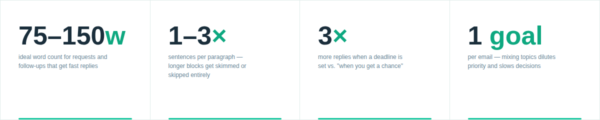
- vague subject lines (“Quick question”)
- long unbroken paragraphs
- unclear ask (“Let me know your thoughts” with no direction)
- no deadline when timing matters
- multiple unrelated topics in one email
- forgetting to mention (or attach) the attachment
How Adaptix Helps You Enforce Better Email Format at Scale
When teams grow, email quality becomes inconsistent. Adaptix helps standardize email format so every message stays clear and on-brand.
With Adaptix, you can:
- build approved templates for common email types (requests, follow-ups, support replies)
- use personalization fields (name, company, last activity) without manual editing
- segment audiences so tone matches the relationship (new leads vs customers vs internal)
- automate follow-ups based on behavior (opened/no reply, clicked/no action)
- track engagement to learn which formats generate replies
In short: Adaptix helps you turn “good email writing” into a repeatable system.
