
Drip Email Campaign: How to Build Automated Sequences That Convert
Most email programs broadcast. They send the same message to everyone on the list at the same time and call it a campaign. The ones driving consistent revenue do something different — they run sequences automatically in the background, triggered by what each subscriber actually does, not a send calendar.
That’s a drip email campaign. And the gap in results between teams that build them well and teams that don’t is not subtle. Automated flows generate 22x more revenue per recipient than one-off campaigns. A single welcome series, when built correctly, consistently outperforms months of broadcast emails. The math is not complicated — you’re sending the right message at the moment someone is actually paying attention.
The problem isn’t awareness. Most marketers know drip campaigns work. The problem is execution — fixed-interval sequences with no behavioral logic, no suppression rules, no deliverability foundation. The sequence looks organized in the platform dashboard. It just doesn’t move anyone.
This guide covers what a drip email campaign is, which types generate the most return, how to build one that actually functions, and — critically — the deliverability layer that most guides skip entirely. Whether you’re running campaigns for your own business or managing automation across a client portfolio, the same principles apply.
What Is a Drip Email Campaign?
A drip email campaign is a series of automated emails sent to a contact based on a trigger — an action they took, a stage they entered, or a time interval that elapsed. Each email in the sequence fires on its own timeline, specific to when that individual entered the flow.
That last part matters. Unlike a broadcast email that fires to your entire list at once, a drip sequence runs per-contact. Ten people sign up on ten different days and each one starts the same sequence from the beginning, on their own clock. That’s what makes drips scalable — you build the sequence once and it runs continuously without manual intervention.
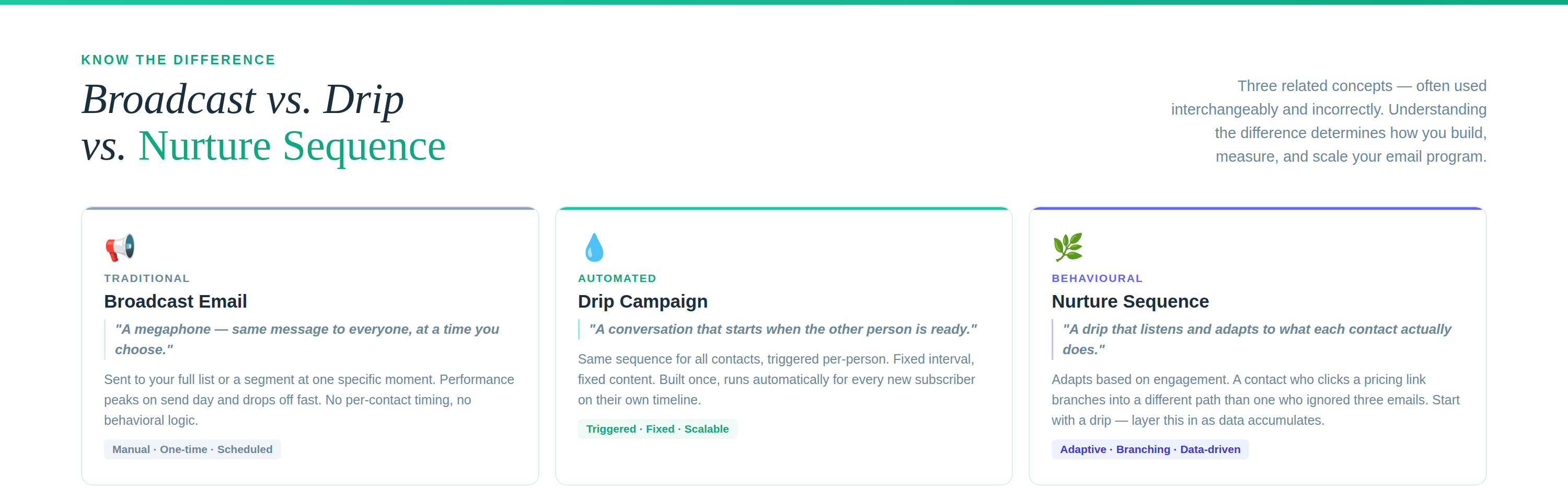
How a drip differs from a broadcast: A broadcast is a megaphone. A drip is a conversation that starts when the other person is ready.
How a drip differs from a nurture sequence: A drip sends the same sequence to everyone on a fixed schedule. A nurture sequence adapts — if someone clicks a pricing link, they branch into a different path than someone who ignored the first three emails. In practice, modern platforms blur the line. You’ll typically start with a drip and layer in behavioral branching as you collect engagement data.
Why Drip Campaigns Outperform Broadcast Emails
The performance gap between automated sequences and one-off campaigns is consistent across industries and audience sizes. A few data points worth internalizing:
- Automated flows generate 22x more revenue per recipient than broadcast campaigns (2026 ecommerce portfolio analysis)
- The top 2% of email send volume — almost entirely automated sequences — accounts for 41% of total email revenue
- A well-built welcome series averages a 24.46% click-through rate — higher than almost any broadcast campaign (Drip automation report)
- Merchants using two or more audience segments earn 17x the revenue of those using a single segment
The reason is timing and relevance. A broadcast email lands when you decide to send it. A drip email lands when the subscriber is most engaged — right after they signed up, right after they abandoned a cart, right after they went quiet for 60 days. The message matches the moment, and the results reflect it.
For agency operators, this means the fastest way to demonstrate ROI for a new client account is to launch one well-built automated sequence — not optimize another broadcast campaign. The baseline performance improvement is immediate and measurable.
7 Types of Drip Email Campaigns (With Sequence Skeletons)
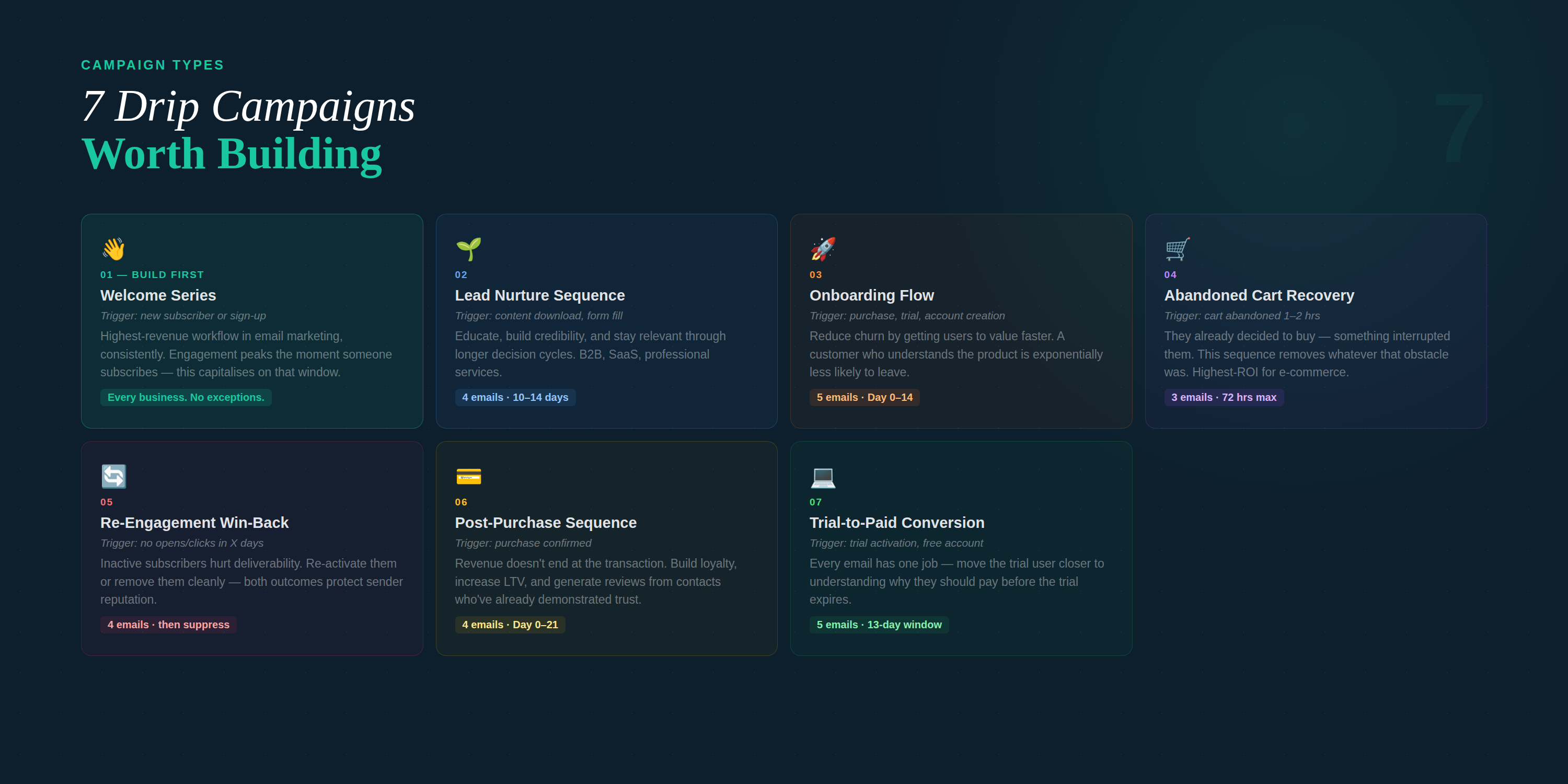
1. Welcome Series
The highest-revenue workflow in email marketing, consistently. Engagement is at its peak the moment someone subscribes — the welcome series capitalizes on that window before attention drops off.
Trigger: New subscriber, sign-up, or lead magnet download
Best for: Every business. There is no exception to running a welcome series.
Welcome Series — Sequence Skeleton |
Email 1 — Immediate: Welcome + deliver any promised asset. Set expectations. Do not sell. |
Email 2 — Day 2–3: Deliver real value — your best content, a useful guide, a key insight. |
Email 3 — Day 5–6: Social proof or a short case study. Build credibility before asking for anything. |
Email 4 — Day 8–10: Soft CTA. Introduce the product or service in the context of a problem they care about. |
Email 5 — Day 12–14: Direct ask — demo, trial, purchase, or consultation. |
Agency Note: Build a welcome series master template with variable blocks — brand name, logo, value proposition, lead magnet link. Clone and customize per client rather than rebuilding from scratch. The structure is universal; the content is not. |
2. Lead Nurture Sequence
For contacts who have shown interest but are not yet ready to buy. The goal is to educate, build credibility, and stay relevant through a longer decision cycle.
Trigger: Content download, webinar registration, form fill, or pricing page visit
Best for: B2B, SaaS, professional services, and any business with a multi-touch sales cycle
Lead Nurture — Sequence Skeleton |
Email 1 — Immediate: Deliver the asset. Confirm what they’ll receive going forward. |
Email 2 — Day 2–4: Problem-framing content. Name the issue they’re trying to solve. |
Email 3 — Day 6–8: Proof. A case study, client example, or data point relevant to their situation. |
Email 4 — Day 10–14: Direct ask — demo, discovery call, or free trial. |
3. Onboarding Flow
For new customers or trial users. The onboarding flow reduces churn by getting people to value faster. A contact who understands how to use the product is exponentially less likely to leave.
Trigger: Purchase confirmation, trial activation, or account creation
Best for: SaaS, subscription products, and service businesses with a defined setup process
Onboarding Flow — Sequence Skeleton |
Email 1 — Immediate: Welcome + clear next steps. Remove friction from the first session. |
Email 2 — Day 1–2: Feature highlight. Focus on the one thing that delivers the fastest value. |
Email 3 — Day 3–5: Tips and best practices. Position the product as something they should get good at. |
Email 4 — Day 7: Check-in or usage prompt. Re-engage anyone who hasn’t returned. |
Email 5 — Day 10–14: Upgrade prompt, renewal reminder, or expansion CTA. |
4. Abandoned Cart Recovery
One of the highest-ROI sequences available to e-commerce and product-based businesses. A contact who abandoned a cart already made a decision to buy — something interrupted them. The sequence removes whatever that obstacle was.
Trigger: Cart abandonment event — typically 1–2 hours after last activity without purchase
Best for: E-commerce, product businesses, and online booking
Abandoned Cart Recovery — Sequence Skeleton |
Email 1 — 1 hour: Simple reminder. Show what they left behind. No discount yet. |
Email 2 — 24 hours: Address objections. Highlight benefits, returns policy, or social proof. |
Email 3 — 48–72 hours: Urgency or incentive. Limited stock, expiring offer, or a modest discount. |
5. Re-Engagement (Win-Back) Campaign
Inactive subscribers are a deliverability liability — they suppress engagement metrics and attract spam classifications. A win-back sequence either re-activates them or removes them cleanly, which protects sender reputation.
Trigger: No opens or clicks within a defined inactivity window
Best for: Any business with an existing email list — run quarterly at minimum
Re-Engagement — Sequence Skeleton |
Email 1 — Day 0: Direct and honest. “We haven’t heard from you.” Simple subject, no tricks. |
Email 2 — Day 4–5: Value content or exclusive update. Give them a reason to stay. |
Email 3 — Day 9–10: Last-chance offer or direct question — do they still want to hear from you? |
Email 4 — Day 14: Suppression. Remove non-responders from active sends. |
Agency Note: Define the inactivity threshold per client — a 30-day threshold for a retail brand running weekly promotions is appropriate. A 90-day threshold makes more sense for a B2B client with a quarterly sales cycle. Using the same threshold across every client account is one of the most common multi-client automation mistakes. |
6. Post-Purchase Sequence
Revenue doesn’t end at the transaction. The post-purchase sequence builds loyalty, increases lifetime value, and generates reviews — all from contacts who just demonstrated they trust the brand enough to buy.
Trigger: Purchase confirmation
Best for: E-commerce, subscription products, and any business with repeat purchase potential
Post-Purchase — Sequence Skeleton |
Email 1 — Immediate: Order confirmation + sincere thank-you. Set delivery or access expectations. |
Email 2 — Day 2–3: How-to or product guide. Help them get value from what they bought. |
Email 3 — Day 7–10: Upsell or cross-sell relevant to their purchase. |
Email 4 — Day 14–21: Review request. Time it after they’ve had a chance to experience the product. |
7. Trial-to-Paid Conversion Flow
For SaaS and software products, the trial-to-paid sequence is the difference between a metric and a revenue number. Every email in this sequence has one job — move the trial user closer to understanding why they should pay.
Trigger: Trial activation or free account creation
Best for: SaaS, software, and any product with a free trial or freemium tier
Trial-to-Paid — Sequence Skeleton |
Email 1 — Immediate: Activation confirmation. Immediate next step to get value from the trial. |
Email 2 — Day 2: Feature education. Focus on the capability most correlated with paid conversion. |
Email 3 — Day 5: Usage milestone or engagement check-in. Adapt message based on activity. |
Email 4 — Day 8–10: Upgrade prompt with clear value framing — what they lose when the trial ends. |
Email 5 — Day 13: Last-chance message before trial expires. |
How to Build a Drip Email Campaign — Step by Step
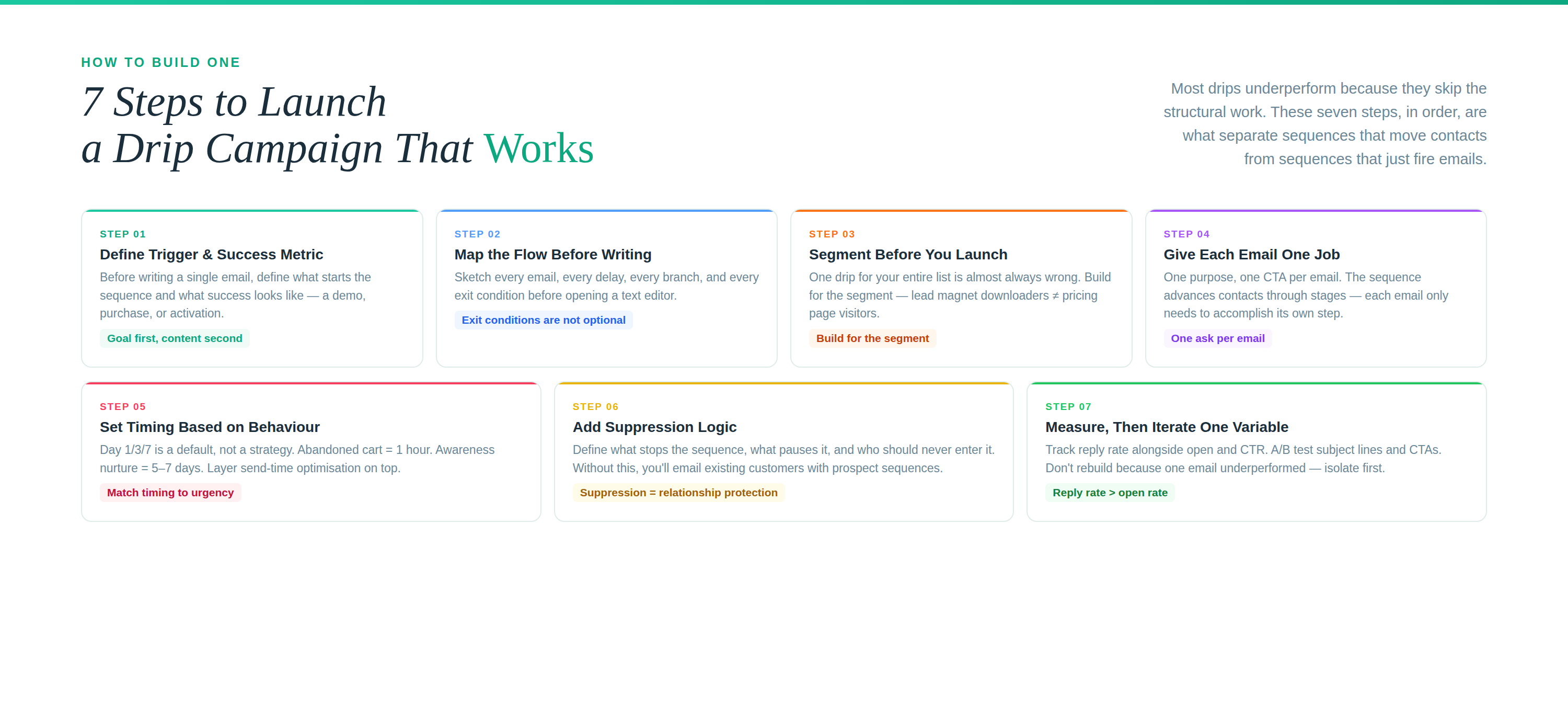
Step 1: Define the Trigger and Success Metric Before Writing a Single Email
Every drip needs one clear trigger — the action or condition that starts the sequence — and one defined success metric. What does this sequence need to accomplish? A demo booking, a purchase, a trial activation, a review submission.
The most common reason drip campaigns underperform is that they’re built before anyone defined what success looks like. Without a clear goal, there’s no logical exit condition, no way to measure performance, and no rational structure for what each email should say.
Step 2: Map the Flow Before Writing
Sketch the sequence on paper or in your automation canvas before you open a text editor. Define: the trigger, every email in order, the delay between each, any conditional branches, and the exit conditions.
Exit conditions are not optional. A sequence that keeps firing after someone converts is wasting sends, inflating contact activity data, and — if it triggers a second welcome email to an existing customer — actively damaging the relationship. Define when the sequence stops.
Step 3: Segment Before You Launch
A single drip for your entire list is almost always the wrong call. A lead who downloaded a pricing guide has different intent than a lead who read a top-of-funnel blog post. Build for the segment, not the full list.
For agency operators: segment per client by entry point, behavior, and stated intent. Use consistent naming conventions across client accounts so sequence logic is immediately readable when you’re managing five or ten flows at once. Clear naming now prevents misrouted contacts later.
Step 4: Give Each Email One Job
Every email in a drip sequence should have a single purpose and a single CTA. Not three links and two asks — one. The sequence does the work of moving contacts through multiple stages; each individual email only needs to accomplish its own step.
Write each email so it makes sense as a standalone message. Subscribers don’t always read in sequence. Someone may open Email 4 without ever seeing Emails 2 or 3. If your fourth email references “the guide we sent last Tuesday,” you’ve already lost the reader who missed it.
Step 5: Set Timing Based on Behavior, Not Convention
The Day 1 / Day 3 / Day 7 cadence is a default, not a strategy. Timing should reflect the urgency of the trigger. An abandoned cart needs a follow-up in one hour, not three days. A lead who downloaded an awareness-stage guide is not ready for a sales call in 48 hours.
Use send-time optimization to layer individual-level timing on top of your sequence logic — when does each specific subscriber actually open email? Combining sequence structure with individual open-window data measurably lifts both open rates and conversions without changing a word of copy.
Step 6: Add Suppression Logic
A drip without suppression rules is an automation liability. Define: what stops the sequence (goal completed, purchased, unsubscribed), what pauses it (bounce, complaint threshold), and who should never enter it (existing customers for a prospect sequence, churned users for an upgrade flow).
For agency operators: suppression logic is where multi-client drip management is either clean or catastrophic. A client’s existing customers should never enter a new-lead welcome sequence. A contact who converted on one product should not receive the same nurture email for that same product 30 days later. Build suppression rules with the same care as trigger rules.
Step 7: Measure, Then Iterate One Variable at a Time
Track reply rate alongside open and click rates. Replies are the strongest engagement signal — they tell you the email created enough response to move someone out of passive reading and into active communication. That matters more than open rate, which is increasingly unreliable due to Apple Mail Privacy Protection pre-fetching.
A/B test subject lines and CTAs. Don’t rebuild the entire sequence because one email underperformed — isolate the variable, test, then apply the learning forward.
The Deliverability Layer — Why Most Drip Campaigns Underperform Before a Single Email Opens
This is the section most drip campaign guides skip. It’s also the reason many well-designed sequences fail silently.
A drip campaign is only as effective as the percentage of emails that actually reach the inbox. A sequence firing at full volume against an unauthenticated domain, or into a dirty list, or without bounce suppression will drive complaint rates up and sender reputation down — not immediately, but progressively. By the time the numbers look bad in the dashboard, the damage to domain reputation is already done.
Authentication: The Non-Negotiable Starting Point
SPF, DKIM, and DMARC alignment must be in place before any sequence goes live. Authentication tells receiving mail servers that you are who you say you are. Without it, even well-crafted emails from a clean list will face filtering and rejection at the infrastructure level.
- SPF: Authorizes which servers can send email on behalf of your domain
- DKIM: Adds a cryptographic signature that verifies the email wasn’t altered in transit
- DMARC: Sets the policy for what happens when SPF or DKIM fail — and gives you reporting visibility into authentication failures
Authentication gaps don’t just affect deliverability — they’re a signal to Google, Yahoo, and Microsoft that a domain is a potential spoofing risk. Once that classification sticks, it takes sustained, consistent sending from a clean reputation to undo it.
Domain and IP Warmup
New domains cannot jump to full-volume drip sends. A domain with no sending history that suddenly fires thousands of automated sequences will be flagged. A warmup schedule gradually increases send volume over weeks, building sender reputation before volume ramps.
For agency operators: every client domain needs its own warmup schedule. A client migrating from another platform who wants to “just start sending” is a conversation worth having before sequences go live. Starting clean is far less expensive than rebuilding a damaged sender reputation.
Bounce and Complaint Thresholds
Unchecked hard bounces and complaint rates above 0.1% will progressively damage inbox placement — not just for the sequences that generated them, but for all sending from that domain. Auto-pause rules trigger when thresholds spike, stopping the sequence before the damage compounds.
This is not a set-it-and-forget-it safeguard. Review threshold data per client account on a regular schedule. A complaint rate climbing toward 0.08% in one account is a warning, not a baseline.
List Hygiene Before Launch
Run validation on any imported or existing list before the first drip sequence touches it. Invalid addresses, duplicates, spam traps, and disengaged contacts belong in suppression, not in a welcome series. Launching a drip into a cold, unvalidated list is one of the fastest ways to send a new sender reputation in the wrong direction.
Adaptix note: Authentication checks, domain/IP warmup schedules, bounce and complaint auto-pauses, and real-time blacklist monitoring are built into the platform. For agency operators managing multiple client domains, per-account health scorecards and guardrails mean one client’s deliverability issues stay contained — they don’t cascade across the portfolio. |
Building and Managing Drip Campaigns Across a Client Portfolio
Running drip campaigns for one business is an execution challenge. Running them across a portfolio of clients is a systems challenge. The difference between an agency that scales email automation profitably and one that drowns in client-specific complexity comes down to a few structural decisions made early.
Build Reusable Flow Templates, Not One-Off Sequences
The welcome series for a local service business and the welcome series for an e-commerce brand follow the same logical structure. Build master flow templates — trigger, sequence logic, email count, delay timing, exit conditions — and customize the content layer per client. Rebuilding from scratch for every new client account is the reason agency email operations don’t scale.
Standardize Naming Conventions
Every sequence, every trigger, every segment across every client account should follow a consistent naming structure. Something like [Client] — [Sequence Type] — [Audience Segment] — [Version]. When you’re managing twenty active flows across eight client accounts, naming consistency is the difference between a workflow you can diagnose quickly and one that requires 20 minutes of archaeology every time something fires unexpectedly.
Separate Sending Infrastructure Per Client
Each client needs their own authenticated sending domain and, in most cases, their own IP infrastructure. Shared sending infrastructure means shared risk. A deliverability problem in one client account — a complaint spike, a blacklist flag, an authentication failure — should never affect another client’s inbox placement. Infrastructure separation is not a nice-to-have at scale; it’s a risk management requirement.
Define Per-Client Suppression and Exit Rules
Suppression logic needs to reflect each client’s business model, not a blanket agency standard. A SaaS client needs purchased contacts suppressed from trial sequences immediately on conversion. A retail client needs post-purchase sequences to run, then hand off to a loyalty flow rather than exiting the automation entirely. Map each client’s customer lifecycle and build suppression rules that reflect it.
Build Standardized Reporting Per Sequence
Report on open rate, CTR, reply rate, conversion rate, and unsubscribe rate per sequence — not aggregate account metrics. Aggregate numbers obscure which specific sequences are performing and which are dragging down overall performance. Clients want to see what their automation is doing; give them sequence-level visibility, not platform-level averages.
Know When to Pause Before a Client Asks You To
Monitor complaint rates and deliverability health per account on a defined schedule. If a client’s complaint rate is climbing or a blacklist flag appears, pause the relevant sequence and investigate before it escalates. Proactive pausing is a client service advantage — it demonstrates that you’re watching the infrastructure, not just the creative. Reactive pausing after something breaks is damage control.
Common Drip Campaign Mistakes — and How to Fix Them
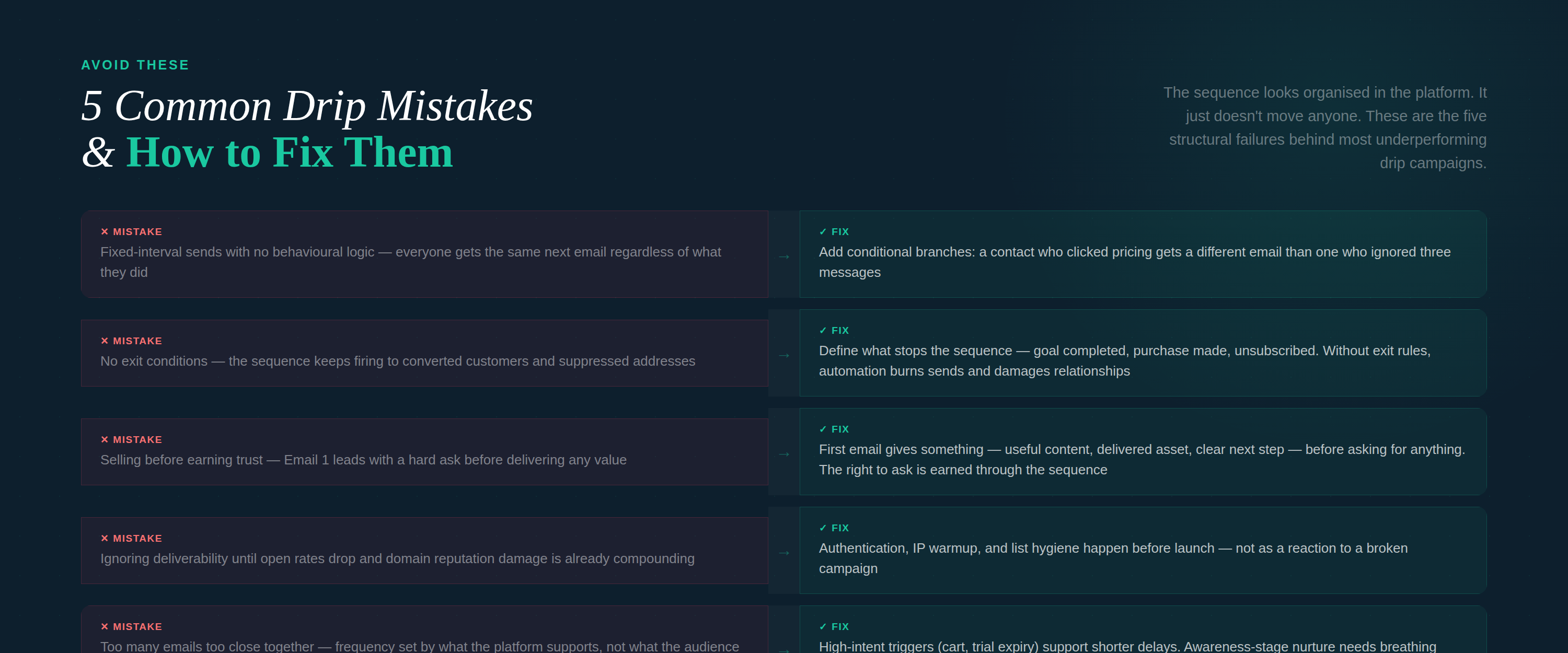
- Mistake — Fixed-interval sends with no behavioral logic
Fix: Add conditional branches that adapt to engagement signals. A contact who clicked a pricing link should receive a different next email than a contact who ignored the first three messages. Calendar-based spacing is a starting point, not a strategy.
- Mistake — No exit conditions
Fix: Define what stops the sequence — goal completed, purchase made, unsubscribed. Without clear exit rules, automation keeps firing to converted customers, inactive contacts, and suppressed addresses. It burns sends, inflates activity data, and damages relationships.
- Mistake — Too many emails too close together
Fix: Review frequency relative to the audience and trigger type. High-intent triggers (abandoned cart, trial expiry) support shorter delays. Awareness-stage nurture sequences need breathing room. When in doubt, reduce frequency and watch engagement before adding volume.
- Mistake — Selling before earning trust
Fix: Restructure early emails around value delivery. The first email in any sequence should give something — useful content, a delivered asset, a clear next step — before it asks for anything. The right to make an ask is earned through the sequence, not assumed on contact.
- Mistake — Ignoring deliverability until something breaks
Fix: Authentication, warmup, and list hygiene happen before launch. By the time deliverability problems appear in open rate data, domain reputation damage is already compounding. Build the foundation first, then build the sequence.
Frequently Asked Questions
What is a drip campaign in email marketing?
A drip email campaign is an automated series of emails sent to a contact based on a trigger — an action they took, a stage they entered, or a time interval. Each contact runs through the sequence on their own timeline, starting when they trigger the flow. Unlike broadcast emails, drips run continuously without manual sends.
How many emails should a drip campaign have?
It depends on the sequence type and the goal. A welcome series typically runs 4–6 emails over 10–14 days. An abandoned cart recovery sequence rarely needs more than 3. A long-cycle B2B nurture sequence may run 6–10 emails over 4–6 weeks. The right number is the minimum required to accomplish the sequence’s defined objective — not the maximum the platform will support.
What’s the difference between a drip campaign and a nurture sequence?
A drip campaign sends the same fixed sequence of emails to every contact on a set schedule. A nurture sequence adapts based on behavior — if a contact clicks a link, they branch into a different path. In practice, most modern platforms support both. Start with a drip structure and layer in behavioral branching as you collect data on how your audience actually responds.
How do I know if my drip campaign is working?
Track reply rate, click-through rate, and conversion rate per sequence — not just open rate. Open rate is increasingly unreliable due to email client pre-fetching. Reply rate is the strongest engagement signal. Conversion rate (purchases, demos booked, trials activated) is the metric the sequence ultimately exists to move. Review these per sequence, per email, not as aggregate account averages.
Does inbox placement affect drip campaign performance?
Directly and significantly. A sequence with a 40% open rate that’s filtered into the spam folder for 30% of recipients is actually a sequence with a 28% effective open rate — and compounding deliverability damage from rising complaint signals. Authentication, list hygiene, and domain health aren’t separate from drip campaign performance; they’re foundational to it.
Build the Sequence Once. Let It Run.
A well-built drip email campaign is the most efficient thing in an email marketing program. It runs while you sleep, adapts to each individual’s timeline, and — when built on a clean deliverability foundation — consistently outperforms any broadcast campaign you could send instead.
The execution gap isn’t knowledge — it’s the infrastructure that makes sequences land in the inbox, the suppression logic that keeps them from firing at the wrong people, and the behavioral branching that adapts when buyer intent becomes clearer.
Adaptix is built to handle all of it — from authentication and warmup to automation canvas to per-account health monitoring for agency operators managing multiple client portfolios.
