
Marketing Automation Workflow Examples
Last Updated: February 2026 Reading time: ~18 minutes
Here’s something most marketing teams won’t admit: a huge chunk of their week is spent doing work a well-configured workflow could handle in milliseconds. Follow-up emails. Lead tagging. Nudging prospects who visited the pricing page three times but never reached out. It’s not that anyone wants to do these things manually — it’s that nobody’s taken the time to set up the systems that eliminate them.
That’s what this guide is really about. Not automation as a concept, but automation as a practical set of workflows you can actually build and deploy. We’re going to cover seven of the most impactful ones — what triggers them, how they move, and where most teams get them wrong.
If you’re new to marketing automation, start at the top. If you already have some workflows running, skip ahead to the ones that look like gaps in your stack.
First, let’s define what we’re actually talking about
A marketing automation workflow is a sequence of actions that runs automatically when a specific trigger occurs. Someone fills out a form — a welcome sequence kicks off. A prospect visits your pricing page twice in a week — a sales alert fires. A customer hasn’t logged in for 30 days — a re-engagement email goes out.
The mechanics are simple: trigger → condition → action. But the value comes from chaining these together thoughtfully, so that what your contacts experience feels like a relationship, not a drip campaign.
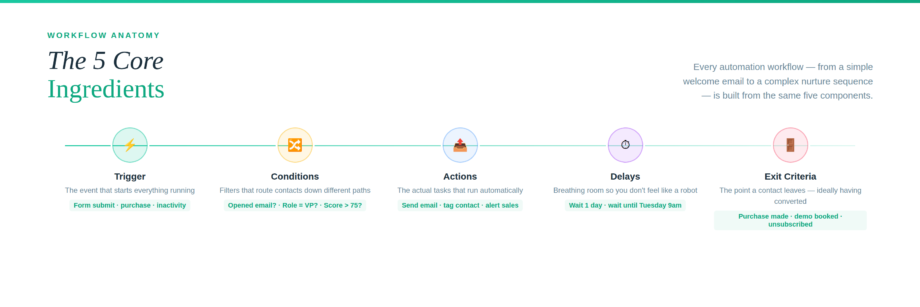
Every workflow has a few core ingredients:
- Trigger — the event that starts everything (a form fill, a purchase, a time delay, a behavior)
- Conditions — filters that route contacts down different paths based on who they are or what they’ve done
- Actions — the actual tasks that run (send email, update CRM field, notify sales rep)
- Delays — the breathing room between touchpoints so you don’t feel like a robot
- Exit criteria — the point at which a contact leaves the workflow, ideally because they’ve done what you were hoping for
With that out of the way — let’s get into the workflows.

1. The Lead Capture & Welcome Sequence
What it’s for: Turning a brand-new lead into someone who actually knows who you are.
Someone lands on your site, downloads a resource, and submits their email. That’s a meaningful signal — they raised their hand. What happens in the next 72 hours will determine whether they remember you next week or forget they ever visited.
A solid welcome sequence does three things: it delivers what was promised, introduces your brand without overselling, and gives the new contact a reason to stay engaged.
Here’s how the workflow flows:
- Trigger: Form submitted on lead magnet page
- Contact is added to CRM, tagged as “New Lead,” and dropped into the right list segment
- Immediately: Delivery email goes out — the thing they actually asked for
- Wait 1 day
- Brand introduction email — keep it short, keep it human, skip the corporate boilerplate
- Wait 2 days
- “Quick win” email — one useful tip or insight tied to the resource they downloaded
- Wait 3 days
- Soft CTA email — invite them to a demo, a consultation, or your product, depending on the offer
The piece most teams skip: personalization based on what the lead told you on the form. If someone identifies as a VP of Sales versus a junior marketer, they should not be reading the same onboarding sequence. Most platforms support dynamic content blocks — use them.
2. Lead Scoring and the Sales Handoff
What it’s for: Getting the right leads to sales at the right moment — not too early, not too late.
This is one of the most important workflows you can build, and also one of the most commonly botched. The typical failure mode: sales gets every lead the moment they submit a form, including people who downloaded a blog post on a whim and have zero purchase intent. Reps waste time, leads feel ambushed, and the whole pipeline gets noisy.
Lead scoring fixes this by assigning points based on behavior and demographics — so your automation can flag a contact as “sales-ready” only when they’ve actually earned the label.
How the workflow runs:
- Trigger: Any tracked engagement event (email click, pricing page visit, webinar attendance, demo watch)
- Points are added or subtracted based on the action (+10 for pricing page, +5 for email click, -5 for unsubscribe from a key list)
- When a contact crosses the threshold (say, 75 points): stage updates to MQL in CRM
- Assigned sales rep gets an immediate notification — email, Slack, whatever your team actually checks
- Contact enters a sales-track email sequence (less educational, more solution-focused)
- If no rep follow-up within 48 hours: escalation alert fires to the sales manager
One thing worth saying plainly: lead scoring models go stale. Review yours every quarter. The behaviors that predicted high intent last year may not mean the same thing today. Your sales team will tell you which leads are actually converting — loop them in and adjust your model accordingly.
3. Long-Cycle Nurture Sequences
What it’s for: Staying relevant with prospects who aren’t ready to buy yet — which, in B2B, is most of them.
Most B2B buying decisions take months. A prospect might engage with your brand five times before they’re seriously evaluating vendors — and another four times before they’re ready to sign. The question is: what are you sending them during that window?
A nurture sequence’s only job is to keep building trust and relevance without pushing for the close before the contact is ready. Push too hard, too early, and you burn the relationship. Go totally dark, and someone else fills that space.
How the workflow flows:
- Trigger: Contact enters “Nurture” stage (didn’t convert after welcome sequence, or manually assigned)
- Educational email — a useful piece of content tied to their industry or role, not a pitch
- Wait 5–7 days
- Social proof email — a customer story or case study that speaks to a problem they likely have
- Wait 5–7 days
- Problem/solution email — address a specific pain point directly, then connect it to what you do
- Wait 7 days
- Medium-touch CTA — a demo video, free trial, or comparison guide (not “book a call” yet)
- If they click → move to sales-ready track; if not → loop back with fresh content
The mistake most teams make here is sending content that’s too generic. Map every piece of nurture content to a buyer journey stage — awareness, consideration, or decision — and make sure you’re building the sequence in that order. Educational content first. Proof second. Pitch later.
4. Abandoned Cart Recovery

What it’s for: Getting back the revenue that walks out your door every single day.
Cart abandonment rates in e-commerce hover somewhere between 65 and 75 percent. That’s not a fringe problem — it’s the default behavior. Most people who add something to a cart are not ready to buy that second; they’re evaluating, comparing, or just getting distracted.
A recovery sequence doesn’t need to be aggressive. It just needs to show up at the right moments with the right message.
How the workflow runs:
- Trigger: Item added to cart, no purchase within 1 hour
- Email 1 (1 hour after trigger): Friendly reminder — product image, direct cart link, no pressure
- Wait 24 hours; check if purchase made
- Email 2 (if still no purchase): Address the objections — shipping costs, return policy, product FAQs, reviews
- Wait 48 hours; check again
- Email 3 (final): Introduce a limited incentive — discount, free shipping, or a bonus item
- Exit: Purchase made at any point → remove from recovery workflow, enter post-purchase sequence
Important: don’t lead with the discount. If you offer 10% off in email one, you’ll train customers to abandon carts on purpose just to get the deal. Use the incentive as a last resort, not an opening move.
5. Post-Purchase Onboarding and Upsell
What it’s for: Making sure customers actually get value — and keeping them around long enough to buy again.
The sale closes and most marketing teams mentally move on. That’s a mistake. The period right after purchase is when customers are most engaged, most open to guidance, and most likely to form a lasting opinion of your brand. It’s also when churn risk is highest if the product doesn’t deliver on what was promised.
How the workflow flows:
- Trigger: Purchase confirmed or account created
- Immediately: Order confirmation + getting started resource
- Wait 1 day
- Day 1 onboarding email — the single most important first step to getting value from the product
- Wait 3 days
- Day 3 email — intermediate tips, underused features, secondary benefits they might not have found
- Wait 7 days; check activation status
- If user has NOT completed a key action (logged in, set up profile, etc.): send re-engagement email + offer live support
- If user has completed activation: introduce complementary product or upgrade path
- Wait 14 days
- Review request + NPS survey
The behavioral branch at day 7 is critical — and most onboarding sequences skip it entirely. An activated user and a dormant user need completely different communication. Don’t send the upsell to someone who hasn’t even logged in yet.
6. Re-Engagement for Inactive Contacts
What it’s for: Making one genuine attempt to win back cold contacts — and cleaning your list when they’re truly gone.
Every email list has a percentage of contacts who’ve essentially gone dark. They’re still technically subscribed, but they haven’t opened anything in months. Sending to these people isn’t neutral — it’s actively hurting your deliverability, skewing your engagement metrics, and signaling to inbox providers that your emails aren’t wanted.
A re-engagement workflow handles this automatically: one last genuine attempt, then a clean exit.
How the workflow runs:
- Trigger: No email open or click in 90 days
- Tag contact as “At Risk” in CRM
- Email 1: A warm, direct message — not salesy. Something like “Haven’t heard from you in a while — wanted to check in.” Offer something genuinely useful.
- Wait 7 days; check for engagement
- Email 2 (if still silent): Ask directly — “Is this still relevant to you?” with a clear “Yes, keep me subscribed” button
- Wait 7 days
- Email 3 (final): A sunset message — transparent, no guilt trip. “We’re going to remove you from this list in a few days unless you’d like to stay.”
- If no engagement after final email: unsubscribe or archive. Remove from active sends.
One note of caution before you sunset anyone: check if they’re active on other channels. Someone who hasn’t opened an email in 90 days might still be a paying customer, an active social follower, or a daily product user. Cross-channel data matters here.
7. Event and Webinar Workflows
What it’s for: Maximizing the ROI of every event — from registration through post-event follow-up.
Events are one of the highest-investment touchpoints in a marketing calendar, and they’re also one of the most commonly under-automated. Most teams send a confirmation email and a day-before reminder, then scramble to follow up manually after the event is over. By that point, momentum has already faded.
Pre-event workflow:
- Trigger: Registration confirmed
- Confirmation email with calendar invite and access link
- Wait until 1 week before event
- Reminder email — agenda, speakers, what to expect
- Wait until 1 day before
- Final reminder with direct join link
- Wait until 1 hour before
- “Starting soon” email or SMS nudge
Post-event workflow (split by attendance):
- Attended: Thank-you email with recording, slides, and key takeaways — within a few hours while it’s still fresh
- Registered but didn’t attend: “Sorry we missed you” email with recording and a low-pressure follow-up offer
- Both paths — wait 2–3 days
- Follow-up with related resources and a soft next step
- Wait 5 days
- For highly engaged attendees: sales outreach or personalized demo invitation
The attended vs. didn’t-attend split is non-negotiable. Sending the same follow-up to both groups is a missed opportunity at best and mildly tone-deaf at worst. Tailor the message to what the person actually experienced.
Where to start if you’re building from scratch

Seven workflows sounds like a lot. It doesn’t need to be all at once.
The fastest way to prioritize is to ask yourself three questions:
Where are you losing the most people? Look at your funnel. Is it at lead capture? Post-trial? After a quote? Start with the biggest leak.
What does your team do manually that follows a predictable pattern? If someone on your team can describe a process in an “if/then” format, it can almost certainly be automated.
Where is the customer experience inconsistent? If the quality of your follow-up depends on which rep handles an account or how busy someone is that week, that’s a process problem automation can fix.
Pick one workflow. Build it properly. Measure it for a few weeks. Then expand. Trying to build all seven simultaneously usually means none of them get built well.
A word on AI-powered automation
The workflows we’ve covered here are rule-based — they do what you tell them to do. That’s a perfectly solid foundation. But it does have a ceiling.
AI-powered automation goes a step further: it learns from behavior patterns, optimizes send times per individual contact, surfaces personalized content without you having to build every branch manually, and flags when a contact’s behavior suggests they’re about to churn — or about to convert. The rules are no longer hard-coded; they adjust based on what actually works.
At Adaptix.AI, that’s what we’re building toward. The goal isn’t automation for its own sake — it’s giving your marketing team more leverage without adding more headcount or complexity. If you’re curious what that could look like for your specific stack, we’re happy to walk through it.
Frequently Asked Questions
What’s the difference between marketing automation and email marketing?
Email marketing is one channel. Marketing automation is the system that coordinates what happens across channels — email, CRM, ads, SMS, and more — based on contact behavior. An email marketing tool sends emails. A marketing automation platform decides which email to send, when, to whom, and what should happen next depending on how that person responds. They’re related, but they’re not the same thing.
How long does it take to set up a marketing automation workflow?
A simple welcome sequence can be live in a day if your content is ready. A more complex workflow — like a lead scoring model with a multi-branch nurture sequence — can take a week or two to build properly, and another few weeks of live data before you have enough to meaningfully optimize it. The setup time isn’t usually the bottleneck; it’s gathering the content and alignment across marketing and sales that takes the most time.
Which marketing automation platforms support these kinds of workflows?
Most major platforms — HubSpot, ActiveCampaign, Marketo, Klaviyo, Salesforce Marketing Cloud — support the core workflow logic we’ve described here. Where they differ is in depth of behavioral tracking, CRM integration quality, AI capabilities, and pricing. The right platform really depends on your team size, sales process, and tech stack. For most growing businesses, HubSpot or ActiveCampaign covers the majority of what’s in this guide without requiring an enterprise budget.
What’s a realistic lead score threshold for a sales handoff?

There’s no universal number — it depends entirely on your business, your sales cycle, and what behaviors actually correlate with closed deals in your pipeline. A common starting point is to review your last 50 to 100 closed/won customers and look at what they did in the 30 days before they converted. Map that behavior to a point scale, set your initial threshold, and then adjust after 60–90 days of live data. The first version of your model won’t be perfect, and that’s okay.
How do I know if my workflows are actually working?
Each workflow should have a clear goal, and that goal should have a measurable outcome. For a welcome sequence: are contacts progressing to the next stage of your funnel at a higher rate than contacts who don’t go through it? For cart recovery: what’s your recovery rate — and has it changed since the workflow went live? For re-engagement: is your list health improving and are your open rates trending up? Track the metric that’s most directly tied to the workflow’s purpose. Everything else is noise.
Can automation feel too impersonal if contacts realize it’s automated?
Automation that’s poorly written will feel robotic. Automation that’s thoughtful, well-timed, and personalized to what the contact actually did often feels more relevant than emails sent by a human who didn’t have time to think about context. The goal isn’t to hide that you’re using automation — it’s to use it well enough that the contact’s experience of your brand is consistently good. Nobody is offended by getting a useful, timely email just because it was triggered automatically.
Is marketing automation worth it for small businesses?
Yes — arguably more so than for large businesses with dedicated teams. When you have a small marketing team (or no marketing team), automation is how you create a consistent customer experience without burning people out. Even a basic welcome sequence and a cart recovery flow can generate meaningful results with relatively low setup effort. Start with the simplest, highest-impact workflow for your business model and go from there.
What’s the most common mistake businesses make with marketing automation?
Building workflows and never revisiting them. Automation doesn’t run itself into the ground overnight — it drifts slowly. Offers go out of date. Sequences reference products that have been discontinued. Email copy that was fresh eighteen months ago starts to feel stale. Set a calendar reminder to audit your active workflows at least once a quarter. The best marketing teams treat automation as a living system, not a set-it-and-forget-it tool.
