
Adaptix allows you to edit multiple contacts at once with the Bulk Editor. The Bulk editor has a list of options you can choose from like changing segments, owners, channels, etc. This tool is very helpful and time efficient when it comes to editing contacts.
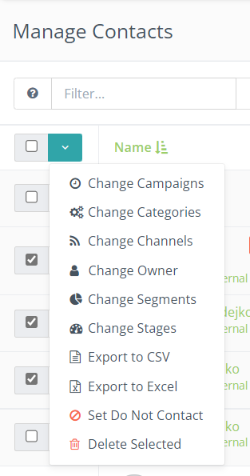
- The bulk editor can be found on the “Manage Contacts” Page.
- Select the contacts you want to edit by checking off the boxes
- Then click the green down arrow button to expand a list of options you can choose from
- Click a option; “Change Segment”, “Change Owner”, Change Channels”, etc.
