
Automated Branding with AI: How to Scale Brand Consistency Across Every Channel
Automated branding explained in plain English
Automated branding (also called brand automation or branding automation) is the use of software to apply your brand rules automatically—so every email, landing page, ad, and template uses the right logo, colors, fonts, imagery, and messaging without someone manually fixing it each time.
Now add AI to the mix and it goes further: AI helps your team produce, adapt, and QA branded content faster—while still staying inside guardrails.
Automated branding doesn’t replace brand strategy or creativity. It removes the repetitive work that causes inconsistency:
- wrong hex codes
- outdated logos
- mismatched fonts
- off-brand imagery choices
- “close enough” copy that drifts in tone
- long approval loops that slow campaigns
In short: automated branding turns your brand guidelines into a living system—not a PDF.
Why automated branding matters now
Modern teams publish across more channels than ever—websites, landing pages, email, social, paid ads, sales decks, events, partners, regional variations, and more. The more people touching brand assets, the higher the risk of inconsistency.
That inconsistency isn’t just visual. It creates real business drag:
- Slower execution (everything needs review)
- Higher costs (design bottlenecks + rework)
- Lower trust (customers notice “off” branding)
- Brand dilution (your message feels different everywhere)
Automated branding is how growing companies keep speed and consistency.
Where AI changes the game in automated branding
Traditional brand automation focuses on rules + templates. AI adds a layer of intelligence that makes automation feel less rigid and more scalable.
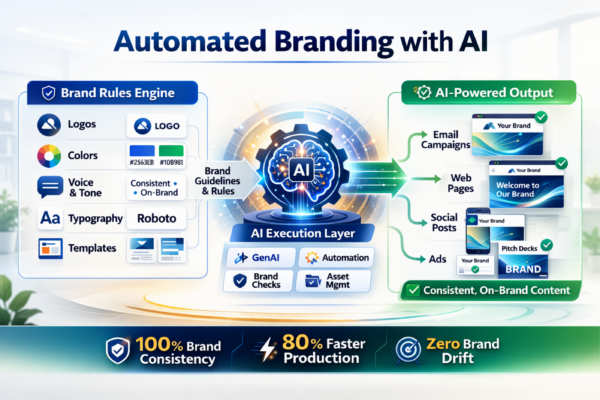
AI helps you stay on-brand in four practical ways
1) Brand-aware content generation
AI can draft copy variations (subject lines, headlines, CTAs, short blurbs) that match your tone—as long as the system has clear guidance (voice rules, do/don’ts, approved phrases).
2) Faster personalization without brand drift
Personalization usually creates risk: when you generate lots of variants, tone and phrasing can drift. AI can personalize while still honoring the same core message and voice constraints.
3) Automated brand QA (quality checks)
AI can flag common issues before they ship:
- tone mismatch (“too salesy,” “too formal,” “too casual”)
- missing required phrases (legal, compliance, disclaimers)
- inconsistent terminology (“clients” vs “customers” vs “members”)
- messaging that conflicts with stated positioning
4) Smarter asset organization and retrieval
AI/ML can help categorize assets, suggest tags, identify duplicates, and improve searchability so teams find the right logo or image faster (not the one someone uploaded three years ago).
Bottom line: AI reduces the time between “idea” and “on-brand execution,” especially when output volume is high.
Automated branding vs marketing automation
These get confused constantly—here’s the clean separation:
- Marketing automation decides when and to whom you send (segments, journeys, triggers, scoring, reporting).
- Automated branding ensures what you send looks and sounds like your brand (visual identity + approved messaging applied consistently).
You need both if you want scale without chaos.
The biggest benefits of automated branding with AI
1) Brand consistency at scale
When the brand rules are baked into systems, outputs stay consistent across:
- teams (marketing, sales, HR, partners)
- regions and sub-brands
- channels (email, web, paid, social)
2) Faster campaign production (less bottleneck)
AI speeds drafts and variations; templates and rules keep it compliant. That’s the combo that removes the “design queue” and “rewrite cycle.”
3) Lower production cost without sacrificing quality
Less rework. Fewer “fix it later” moments. Designers focus on high-value creative rather than policing basics.
4) Better agility for real-world moments
Responding quickly only works if teams can produce assets fast without breaking the brand. AI-assisted creation + automated guardrails makes that possible.
What a real automated branding system includes
Most companies end up building some combination of these components:
Centralized brand assets (single source of truth)
- logos + approved variations
- icons and imagery
- design components
- approved copy blocks and messaging
Live brand guidelines (not static PDFs)
- color palette (hex/RGB usage)
- typography rules
- logo do/don’t examples
- voice & tone guidance
- imagery style guidance
- mission + positioning statements
Templates that enforce brand rules
- email templates
- landing page sections
- form styles
- headers, footers, buttons, typography styles
- reusable content modules
Governance + permissions
- who can edit what
- who can publish
- what requires approval
Workflow automation + AI assist
- notifications and review steps
- AI-supported drafting and iteration
- brand QA checks before publish
- version control cues and “latest approved” defaults
The problem most teams hit: your brand assets live in too many places
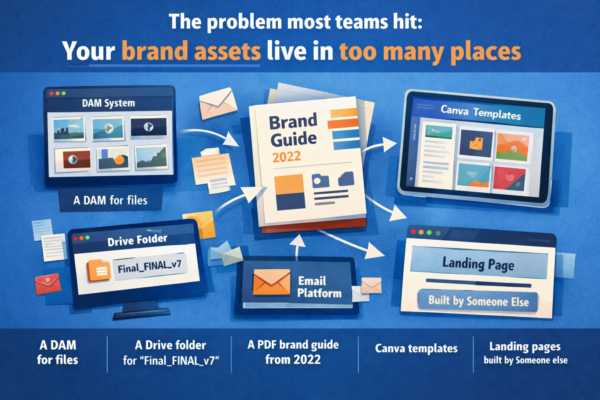
A lot of teams have:
- a DAM for files
- a Drive folder for “final_FINAL_v7”
- a PDF brand guide from 2022
- Canva templates
- email templates in a separate platform
- landing pages built by someone else
That’s not a system. That’s a scavenger hunt.
Automated branding fixes this by connecting brand identity to execution—so your team can build faster and stay aligned.
How Adaptix makes automated branding happen with brand kit
Adaptix includes a brand kit capability designed to turn your brand into reusable, enforceable building blocks across marketing execution.
Instead of asking your team to “follow the brand guide,” Adaptix helps you operationalize it—and sets you up to use AI safely (because AI needs rules, examples, and constraints to stay on-brand).
What Adaptix brand kit can capture (and standardize)
Visual identity
- primary + secondary colors (with usage rules)
- logos (variants, background rules, sizing guidance)
- fonts / typography standards
- image style guidance (photography, illustrations, icons)
Brand messaging
- mission statement
- positioning and value props
- voice/tone guidance
- approved phrases + banned phrases (do’s and don’ts)
- boilerplate copy blocks (about blurbs, footers, compliance language)
Execution rules
- brand do’s and don’ts
- layout preferences
- “approved components” your team can safely reuse
Where AI becomes safer and more effective
When your brand kit contains the “source material” (voice rules, mission, key messages, approved terms), AI can:
- generate drafts that match your tone
- create variations without drifting into off-brand language
- keep terminology consistent across channels
- reduce time spent rewriting and reviewing
Think of it like this: brand kit defines the guardrails; AI helps you drive faster.
A practical implementation plan for automated branding with AI in Adaptix
Step 1: Consolidate your brand source of truth
Collect:
- all logo files + correct use cases
- official color palette (hex codes)
- typography choices (primary/secondary)
- voice rules + do/don’t examples
- 10–20 “gold standard” examples of on-brand assets
Step 2: Build your Adaptix brand kit
Load the fundamentals first:
- colors, logos, fonts
- mission statement + voice guidance
- do/don’t rules and approved phrases
Then expand into:
- imagery style guidance
- reusable copy blocks (taglines, footers, “about” blurbs)
- modular sections for common pages/campaigns
Step 3: Create “safe templates” that enforce the brand
Start with the highest-volume assets:
- newsletter template
- event/course promo template
- lead magnet template
- standard landing page layout
- core form styles
Step 4: Add AI-assisted drafting with human review
Use AI to accelerate the “first 80%”:
- draft versions for different audiences
- generate headline/CTA variants
- localize tone for channels (email vs landing page vs social)
Then keep a simple review rule:
- humans approve core messaging and high-visibility pages
- templates enforce visual consistency automatically
Step 5: Train teams with simple rules
Enablement should be short and practical:
- “If you use these templates, you’re on-brand.”
- “If you need something new, request a module once—then everyone benefits.”
- “AI is allowed inside the brand kit rules—don’t freestyle outside them.”
Use cases that make automated branding with AI a no-brainer
- Multi-location businesses (local execution, HQ consistency)
- Agencies managing multiple client brands at once
- Fast-growing teams producing high content volume
- Enterprises with regions, sub-brands, and compliance risk
- Education / training orgs promoting many programs with many creators
Common mistakes to avoid
- Using AI without brand rules. You’ll get “pretty good” content that slowly drifts off-brand.
- Treating the brand kit like a one-time upload. It needs ownership and updates.
- Over-locking everything. Teams need flexibility inside guardrails.
- Separating guidelines from templates. The value comes from connecting rules to execution.
Final Takeway 
Your brand can’t scale on good intentions and a PDF. If you want speed and consistency—especially with AI in the mix—you need a system that turns brand standards into daily execution.
Automated branding does that. Adaptix brand kit is where you define the guardrails—so your team (and AI) can produce more, faster, without brand drift.
FAQ: Automated branding with AI
