
Marketing Automation for Small Business: The 2026 Complete Guide to Simple, Revenue-Driving Automation
Last Updated: February 2026 Reading time: ~18 minutes
What You’ll Learn
- What marketing automation actually is (and what it isn’t) for small businesses
- Which automations deliver the fastest return on investment
- How to pick the right tools without overspending
- A step-by-step framework to go from zero to running your first workflows
- Real benchmarks and data to set realistic expectations
The Case for Automation (With Numbers Behind It)
Small business owners don’t typically have a marketing team. You’re handling customer calls, managing inventory or delivery, keeping the books, and somewhere in between all of that, you’re supposed to nurture leads, follow up with past customers, and stay visible online.
Marketing automation doesn’t fix all of that, but it does handle a meaningful slice of the work that would otherwise fall through the cracks.
Here’s what the data looks like heading into 2026:
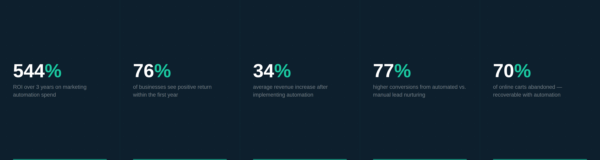
- Companies earn $5.44 for every $1.00 spent on marketing automation — a 544% ROI over three years (Nucleus Research)
- 76% of businesses see a positive return within the first year
- Businesses using automation report an average 34% increase in revenue
- 80% of users report improved lead generation after implementing automation
- Automated lead nurturing produces 77% higher conversion rates than manual follow-up
These aren’t numbers from enterprise companies with six-figure marketing budgets. Much of this growth is happening at the small and mid-sized business level, precisely because automation closes the gap between what a small team can do manually and what a larger operation can sustain with dedicated staff.
The real cost isn’t the subscription. It’s the revenue you’re leaving on the table when a lead goes cold because nobody followed up.
What Marketing Automation Actually Means for a Small Business
Before going further, it’s worth being specific about what “marketing automation” means in practice — because the term gets applied to everything from a simple welcome email to a complex, multi-channel customer journey.
For a small business, marketing automation is any system that sends the right message to the right person at the right time, based on triggers you define, without requiring you to manually do it each time.
That could look like:
- A new subscriber gets a welcome email within five minutes of signing up
- A customer who bought six months ago gets a re-engagement offer
- Someone who visited your pricing page three times gets a targeted follow-up from your sales inbox
- A cart abandonment reminder goes out two hours after someone leaves your checkout
These aren’t complicated. What makes them powerful is consistency. They happen every single time, on schedule, whether you’re in a client meeting or on vacation.
The Six Automations Worth Starting With
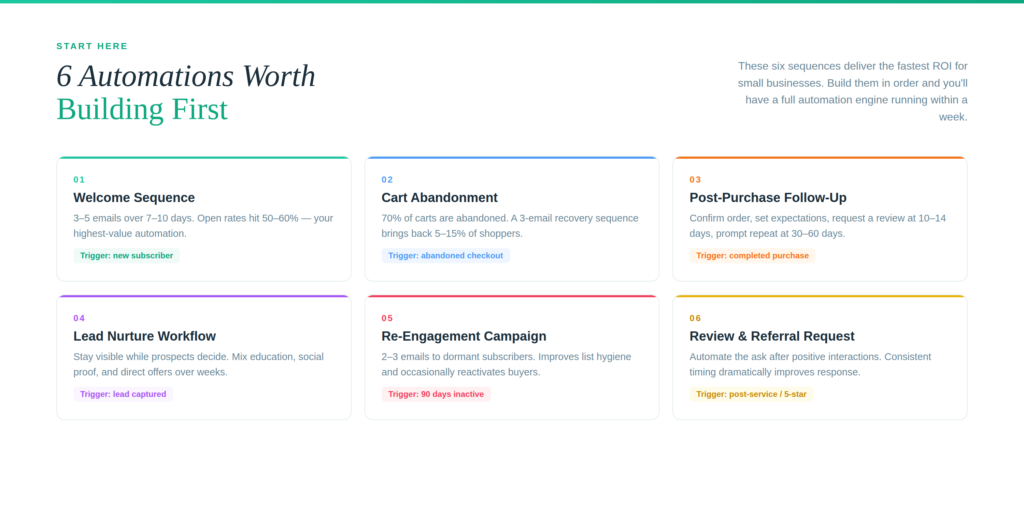
Not all automations are created equal. Some take days to build and deliver marginal results. Others take an afternoon and run for years. Here are the six worth prioritizing first.
1. Welcome Email Sequence
When someone joins your email list, they’re at peak interest. That moment has a short shelf life. A welcome sequence — typically three to five emails sent over the first week to ten days — introduces your business, establishes credibility, and moves new subscribers toward a meaningful first action.
Welcome emails generate open rates between 50% and 60%, compared to the industry average of around 20% for standard campaigns. The revenue lift from a single well-built welcome sequence often outpaces the entire rest of your email program.
A basic structure that works:
- Email 1 (immediate): Thank them, deliver the lead magnet or offer that prompted signup, and set expectations for what they’ll hear from you.
- Email 2 (day 2–3): Share a useful insight, case study, or resource that builds trust without selling.
- Email 3 (day 5–7): Introduce your product or service directly, with a clear next step.
2. Abandoned Cart Recovery
For e-commerce businesses, cart abandonment is the single most recoverable revenue loss in marketing. On average, roughly 70% of online shopping carts are abandoned before purchase. Automated recovery emails bring back between 5% and 15% of those customers.
A three-email sequence — one sent within an hour, one at 24 hours, and a final one with a modest incentive at 48–72 hours — is the standard structure. Omnisend’s 2025 benchmark data puts cart recovery automations among the highest-revenue automations by a significant margin.
If you sell online and don’t have this running, you’re leaving money on the table every day.
3. Post-Purchase Follow-Up
The relationship with a customer doesn’t end at checkout. A post-purchase sequence serves multiple purposes: it confirms the order, sets delivery expectations, requests a review at the right moment, and plants the seed for a repeat purchase.
Timing matters here. Review requests sent 7–14 days after delivery (when the customer has actually had time to use the product) convert significantly better than requests sent immediately after purchase. Repeat purchase prompts work best 30–60 days post-purchase, depending on your typical purchase cycle.
4. Lead Nurture Workflow
Not every lead is ready to buy today. For service businesses especially, prospects often need weeks or months of touchpoints before making a decision. A lead nurture workflow automates this process.
The goal is to stay visible and provide value while the prospect moves through their decision process. This typically involves a mix of educational content, social proof, and periodic direct offers. Tools like ActiveCampaign and HubSpot allow you to build these workflows visually, triggering different paths based on whether someone opens an email, clicks a link, or visits a specific page on your website.
5. Re-Engagement Campaign
Every email list contains subscribers who’ve gone quiet. Before removing them, run an automated re-engagement sequence. This is a short series — typically two to three emails — that asks whether they want to stay subscribed and offers something to bring them back.
Beyond list hygiene, re-engagement campaigns occasionally produce surprisingly strong results. Some of your most dormant subscribers turn out to be buyers who just needed the right prompt.
6. Review and Referral Request
Word-of-mouth and reviews are among the most credible forms of trust-building a small business has. Automating the request removes the awkwardness of asking manually and ensures it happens consistently.
Trigger a review request 10–14 days after a service is completed or a product is delivered. For referrals, a separate trigger after a confirmed positive interaction (a 5-star review, a repeat purchase, or a support ticket marked resolved) creates a natural moment to ask.
Choosing the Right Tools for a Small Business
The marketing automation software market is crowded, and the pricing models vary significantly. Here’s an honest breakdown of what makes sense at different stages and use cases.
Adaptix — Built Specifically for This Problem
If you’ve ever tried to stitch together an email platform, a landing page builder, an SMS tool, and an analytics dashboard from four different vendors, you already understand the problem Adaptix.ai was built to solve.
Adaptix combines email marketing, automation flows, landing pages, SMS messaging, and revenue attribution analytics into a single platform — with transparent, contact-based pricing.
The workflow builder uses a visual, drag-and-drop canvas that handles triggers, conditional splits, time-delay scheduling, and goal tracking in one place. You can launch from a pre-built template — welcome sequences, trial-to-paid conversions, win-back campaigns — or build from scratch. A/B testing runs directly inside the flow editor, so you’re not toggling between screens to run experiments.
A few things that make Adaptix worth serious consideration for small businesses:
Unified channel execution. Email and SMS live on the same flow canvas, so your customer communications stay coordinated without requiring separate automations that can drift out of sync.
Segmentation that actually works. Adaptix supports demographic, firmographic, and behavioral segmentation, meaning you can target based on what people have done (clicked, purchased, visited a page) rather than just who they are on paper.
Revenue attribution. Most budget-friendly platforms tell you open rates and clicks. Adaptix ties campaign performance directly to revenue, so you can see which automations are generating real returns — not just engagement metrics.
Migration support. For businesses moving off another platform, Adaptix will migrate your lists, templates, domains, and key automations, which removes the most common barrier to switching.
For small businesses that want a professional-grade automation stack without assembling it from multiple vendors, Adaptix is the most direct path there.
For Bootstrapped or Early-Stage Businesses
MailerLite is a strong starting point for businesses with simple email needs. Its free plan supports up to 1,000 subscribers and 12,000 emails per month, and the automation builder covers the basics well. Paid plans start at $9/month. The trade-off is limited CRM functionality and no SMS — it’s a good fit if email-only automation is all you need right now.
Brevo (formerly Sendinblue) prices by email volume rather than list size, which benefits businesses with large contact lists who send at moderate frequency. Its free tier includes unlimited contacts and 300 emails per day. Brevo also covers SMS and WhatsApp, which makes it worth considering if multichannel reach on a tight budget is the priority.
For Growing Businesses That Need Deep CRM Integration
HubSpot remains the most recognizable all-in-one option, with a genuinely useful free CRM tier and a marketing hub that connects lead capture, email automation, and contact management cleanly. The visual workflow builder is beginner-friendly. Paid plans start at $15/user/month, though costs scale quickly at higher contact volumes and feature tiers.
ActiveCampaign is worth looking at if conditional email logic and deep segmentation are central to your automation strategy. It offers over 900 pre-built workflow templates and strong behavior-based triggers. Starter plans begin at $15/month; CRM features require the Plus plan at $49/month.
For E-Commerce Businesses
Klaviyo leads the market for online stores, particularly those on Shopify. Browse abandonment, product view history, and purchase-triggered flows are native features rather than workarounds. Pricing scales by contact count, with a free tier up to 250 contacts.
Omnisend is a practical Klaviyo alternative for smaller stores that want SMS bundled in at a lower price point.
A Note on Tool Stacking
The instinct is often to find one tool that does everything, but then settle for one that does most things poorly. Adaptix is designed to break that pattern — covering the full loop from capture to conversion to re-engagement without requiring bolt-on integrations for basic functionality. For businesses that do need to connect outside tools, Adaptix integrates with Zapier, giving you access to the broader ecosystem when a specific workflow calls for it.
Don’t optimize for using fewer tools. Optimize for having the right tools that your team will actually log into and use.
How to Set Up Your First Automation: A Practical Framework
Many businesses stall at implementation. Here’s a framework that gets you from decision to running workflow in a structured way.
Step 1: Map Your Customer Journey First
Before touching any software, write down the key moments in your customer lifecycle on paper:
- How do people find you?
- What do they do before buying?
- What happens immediately after they buy?
- What would bring them back?
- What causes them to go quiet?
Each of these moments is a potential automation trigger. Start with the ones that represent the highest-volume or highest-stakes touchpoints in your business.
Step 2: Start With One Automation
The temptation is to build everything at once. Resist it. Pick the single automation most likely to produce a visible result — usually the welcome sequence or cart abandonment recovery — and build that one properly.
A single automation that works well builds confidence in the system and gives you a benchmark against which to measure everything that follows.
Step 3: Write the Emails Before Configuring the Workflow
The technical setup in most platforms takes 30 minutes. The writing takes longer and matters more. Draft your emails before opening the automation builder. This keeps you focused on the message rather than the mechanics.
What works in automated emails:
- Conversational, direct language — these are not campaigns, they’re conversations
- A single, clear call to action per email
- Subject lines that give the recipient a reason to open, not just a description of what’s inside
- Personalization that reflects what the subscriber actually did (what they signed up for, what they bought, when they last engaged)
Step 4: Set Realistic Triggers and Delays
The timing of automated emails affects their performance significantly. As a starting point:
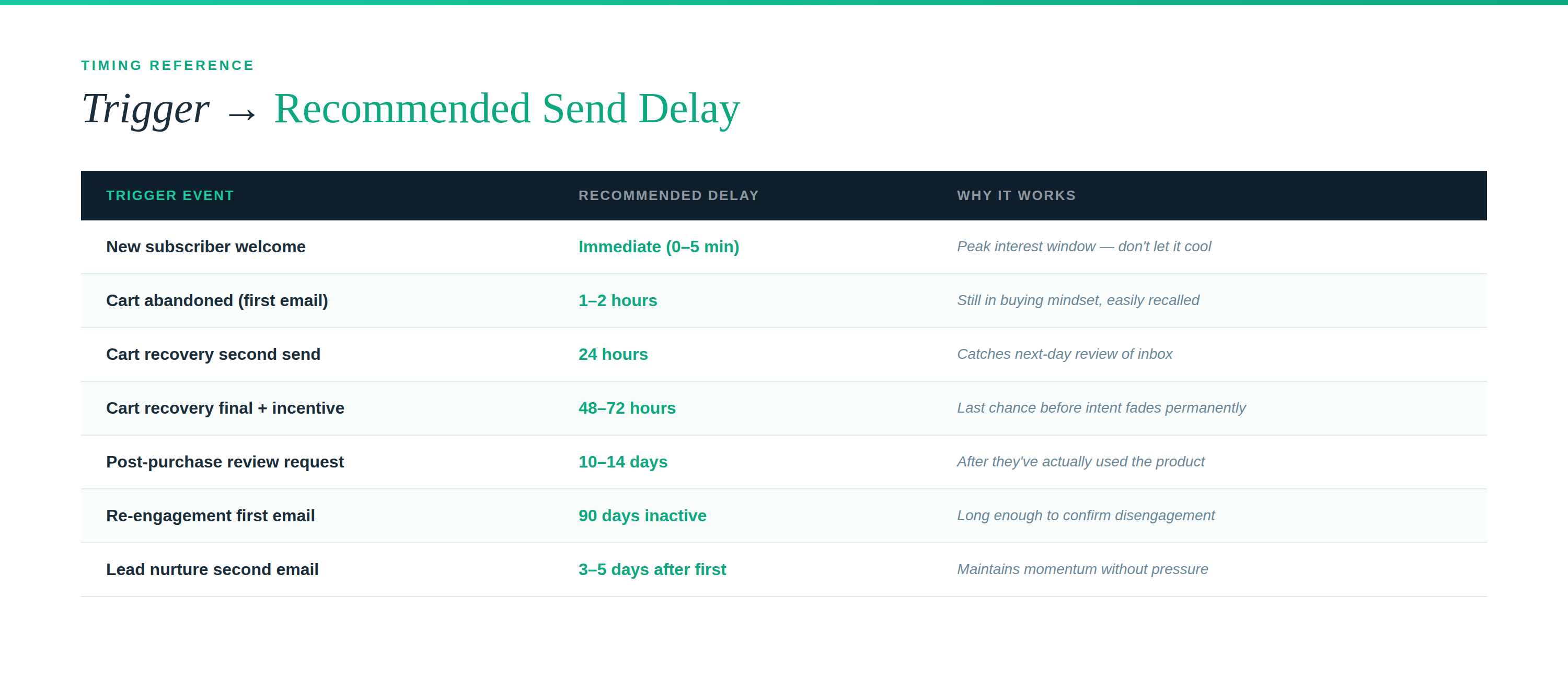
These are starting points, not rules. Your business may have a longer or shorter sales cycle that changes what makes sense.
Step 5: Measure Three Things
Once your automation is live, there are three metrics worth tracking consistently:
Open rate tells you whether your subject lines and timing are working. A below-average open rate is a subject line and sender reputation problem, not a content problem.
Click-through rate tells you whether your content and call to action are compelling. Low clicks with decent opens means the email content isn’t connecting.
Conversion rate — the ultimate measure — tracks whether people took the action you wanted. For a welcome sequence, this might be a demo booking or a first purchase. For cart recovery, it’s a completed transaction.
Don’t optimize based on single sends. Look at rolling averages across 30-day periods once you have enough volume.
Common Mistakes That Derail Small Business Automation
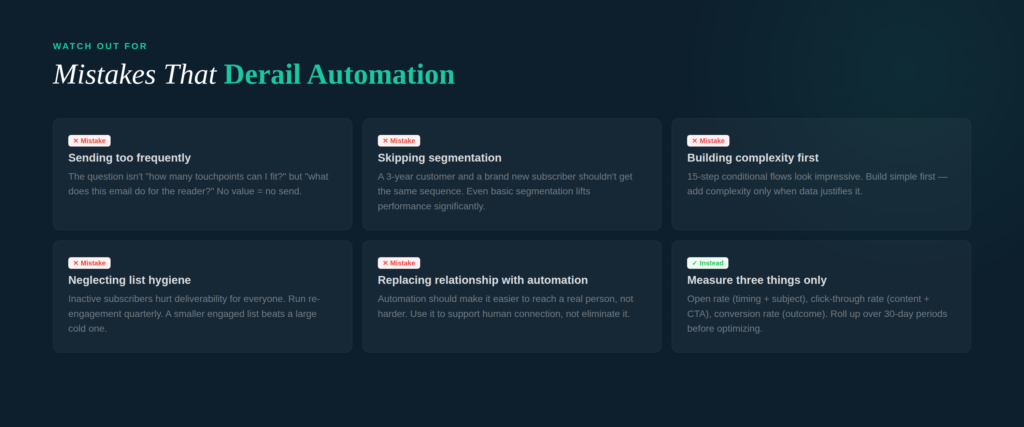
Understanding where people go wrong saves you from rebuilding things that didn’t need to fail.
Sending too frequently without a clear value exchange. Automation makes it easy to send more emails than you should. The question isn’t “how many touchpoints can I fit in?” but “what does this email do for the person receiving it?” If you can’t answer that, the email shouldn’t exist.
Using automation to replace relationship, not support it. The businesses that see the strongest results from automation are the ones that use it to be consistently present, not to avoid human interaction. Your automation should make it easier for interested customers to reach a real person, not harder.
Skipping segmentation. Sending the same automated sequence to every contact on your list ignores the reality that a brand-new subscriber and a three-year customer should receive different messages. Even basic segmentation — by signup source, purchase history, or engagement level — significantly improves performance.
Building complexity before proving the basics. Multi-branch conditional workflows with 15 steps look impressive. They also take weeks to build, are difficult to troubleshoot, and often produce marginal improvements over simpler sequences. Build simple first. Add complexity when the data justifies it.
Neglecting list hygiene. Inactive subscribers hurt email deliverability, which affects everyone on your list. Run re-engagement campaigns quarterly. Remove contacts who don’t respond. A smaller, engaged list outperforms a large, disengaged one in every measurable way.
Where Marketing Automation Fits in Your Broader Strategy
Automation is a multiplier, not a replacement for strategy. It makes a well-designed marketing approach more effective. It can’t rescue a poorly defined offer or unclear positioning.
The businesses seeing the strongest returns from automation in 2026 share a few common traits: they understand their customer well enough to write relevant, timely messages; they treat automation as an ongoing program that gets tested and improved, not a one-time setup; and they use automation to create headspace for higher-value marketing work, not to eliminate marketing thinking entirely.
Lead quality and conversion rate now rank as the top two marketing metrics that matter to businesses in 2026, according to HubSpot’s State of Marketing Report. Automation, done well, improves both — by ensuring no lead falls through the cracks and by delivering more relevant messaging at each stage of the buying process.
The practical starting point is simpler than most people expect: one good welcome sequence, one recovery automation if you sell online, and a consistent post-purchase follow-up. That’s a half-day of setup that can generate measurable returns for years.
Quick Reference: Marketing Automation Checklist for Small Businesses
Before you start:
- [ ] Identify your highest-value customer touchpoints
- [ ] Choose a platform that fits your tech stack and budget
- [ ] Map out the sequence structure before logging into the tool
Automations to build first:
- [ ] Welcome email sequence (3–5 emails over 7–10 days)
- [ ] Cart abandonment recovery (if applicable)
- [ ] Post-purchase follow-up with review request
- [ ] Lead nurture workflow for non-buyers
- [ ] Re-engagement campaign for inactive subscribers
Ongoing maintenance:
- [ ] Review performance metrics monthly
- [ ] A/B test subject lines on high-volume automations quarterly
- [ ] Run a list re-engagement sequence every 90 days
- [ ] Audit workflows annually for relevance and accuracy
Frequently Asked Questions
How much does marketing automation cost for a small business?
Entry-level automation tools start at $0–$15/month (MailerLite, Brevo, HubSpot’s free CRM). Most small businesses operate effectively on $30–$100/month depending on list size and features needed. The investment typically pays for itself within the first few campaigns.
Do I need technical skills to set up marketing automation?
Most modern platforms are designed for non-technical users. If you can write an email and use a drag-and-drop interface, you can build functional automations. The more important skill is marketing thinking — understanding what to say and when.
What’s the difference between email marketing and marketing automation?
Email marketing refers to sending messages to your list — newsletters, promotions, announcements. Marketing automation includes email but extends to behavior-triggered workflows, lead scoring, CRM integration, and cross-channel coordination. Most small businesses start with email automation and expand from there.
How long does it take to see results?
Most businesses see measurable impact within 30–60 days of launching their first automation. Full ROI typically materializes within 6 months, though some automations — like cart recovery — produce results within the first week.
Which platform is best for a very small business?
Adaptix.ai if you want email, SMS, landing pages, automation, and analytics in one place with no per-user fees — it’s purpose-built for this use case. MailerLite works well for email-only needs on a minimal budget. Brevo if you want multichannel reach at very low cost. HubSpot’s free tier if CRM is the main priority. The best platform is the one your team will actually log into and use consistently.
About Adaptix.ai
Adaptix.ai helps small and growing businesses build marketing systems that work without a large team behind them. Our guides, tools, and resources are designed for business owners who want practical, results-focused approaches — not marketing theory.
This guide is updated regularly to reflect changes in platform pricing, industry benchmarks, and best practices. Statistics sourced from Nucleus Research, HubSpot State of Marketing 2026, Omnisend 2025 Ecommerce Marketing Report, and Klaviyo 2024 Benchmark Report.
